Creating an XML File using the XMLDoc object in PeopleCode

 The process in brief:

  1. Create and load a rowset
  2. Enrich the data in that rowset
  3. Create and XMLDoc object and load the data
  4. Use one of the XMLDoc’s built-in methods to generate an XML string.

For demonstration purposes, our premise is creating an XML file for a BI Publisher report.   However, there are other situations requiring XML Files.   The XMLDoc is extremely flexible and powerful enough to generate the XML file as required by the target specification.

Premise for XML File Creation Example

Demonstration premise: A letter to all employees summarizing their current job and showing all training taken through the company.  This is a complex data set with a parent/child relationship.  Each employee will get a separate page in the report.  For each employee, there will be zero or more training entries.  The class returns this Rowset object:

Employee Record: EE_RPT_LTR_VW (Parent Record) • EMPLID • NAME • DEPTID • LOCATION • JOBCODE • COMPRATE • CHANGE_PCT • LOCATION_DESCR • JOB_DESCR • COMPANY_DESCR • EMPLOYEE_PHOTO • Training Record: TRAINING_VW (Child Records) • EMPLID • COURSE_START_DT • COURSE • SESSION_NBR • COURSE_TITLE • COURSE_END_DT • ATTENDANCE • TRAINING_REASON • COURSE_GRADE • PREREQ_MET • DEPTID • BUSINESS_UNIT

XMLDoc method of creating an XML File

The XMLDoc object is PeopleTools utility to manipulate XML Files in their native format.  One of these objects methods is to generate a formatted XML string from the current XMLDoc structure.  The developer creates an XMLDoc structure and adds “Nodes” to the document to create tags and structure.  The level the node is attached to determines the structure of the XML document.

Though this code may look similar to a freehand method, realize that the object is maintaining the structure.  The developer is not concerned with end tags and completing parent child structures for the document.  As each node is added, the value of that node is set. 

When all the data has been moved to the XMLDoc object, use the “GenFormattedXmlString” method of the object to create the entire XML file in one string.  Then write that string to file.

import PSXP_RPTDEFNMANAGER:*;
import X_BI_PUB_PCODE:LoadTestData;

Local XmlDoc &inXMLDoc;
Local XmlNode &childNode, &textNode, &midNode, &rowNode;
Local File &XML_File;

Local X_BI_PUB_PCODE:LoadTestData &LoadTestData = create X_BI_PUB_PCODE:LoadTestData();
&RS_Employee = &LoadTestData.LoadTestDataSet();

/* Create & Load XMLDoc */
&inXMLDoc = CreateXmlDoc("<?xml version='1.0'?><root/>");

For &i = 1 To &RS_Employee.ActiveRowCount
   &rowNode = &inXMLDoc.DocumentElement.AddElement("EMPLOYEE_DATA");
   &EE_RPT_LTR_VW_REC = &RS_Employee(&i).GetRecord(Record.EE_RPT_LTR_VW);
   
   For &f = 1 To &EE_RPT_LTR_VW_REC.FieldCount
      &childNode = &rowNode.AddElement(&EE_RPT_LTR_VW_REC.GetField(&f).Name);
      &childNode.NodeValue = String(&EE_RPT_LTR_VW_REC.GetField(&f).Value);
   End-For; /* record fields */
   
   &RS_Training = &RS_Employee(&i).GetRowset(Scroll.TRAINING_VW);
   For &j = 1 To &RS_Training.ActiveRowCount
      &X_TRAINING_VW_REC = &RS_Training(&j).GetRecord(Record.TRAINING_VW);
      &midNode = &rowNode.AddElement("TRAINING_DATA");
      
      For &f = 1 To &TRAINING_VW_REC.FieldCount
         &childNode = &midNode.AddElement(&TRAINING_VW_REC.GetField(&f).Name);
         &childNode.NodeValue = String(&TRAINING_VW_REC.GetField(&f).Value);
      End-For; /* record fields */
   End-For; /* training rowset */
End-For; /* employee rowset */

&Xml_String = &inXMLDoc.GenFormattedXmlString();

&XML_File = GetFile("XMLDOC.xml", "W", "UTF8");
&XML_File.WriteLine(&Xml_String);

/* save file name and path for publishing */
&XML_Filename_path = &XML_File.Name;
&XML_File.Close();

XML File Generation Considerations

Concurrency: Generating multiple versions of the same report simultaneously 

PeopleSoft by its very nature may have multiple, different users attempting to create the same report at the same time.  Ensure that your code accounts for this probability by making the file names unique per each instance of the report.  One idea to accomplish this is to append the User or Employee ID to the file creating a unique file name. 

Another method is to append the current date/time stamp to the filename to force uniqueness. 

Schema Files

For PeopleTools version 8.48 & 8.49, BI Publisher requires XML Schema files for the correct mapping of tags to a PDF Template.  You could include these for RTF (MSWord) templates, but they were not necessary.

The easiest way to generate correct schemas for the generated XML Files is to use an XML File editing utility such as XML Spy or XML Fox.  XML Fox is a freeware utility that works very nicely.  These utilities can generate schemas from your final XML Files.

Starting with PeopleTools 8.50, BI Publisher does not require a schema file for PDF Template mapping.  Only a sample data file is required.

Sample Files for defining BI Publisher Data Sources

You must provide a Sample XML Data file when creating a new BI Publisher report.  A good idea is to execute a version of the XML File generation code using a sample or representative employee.  Another good idea is to, for the sample run, modify your code to put the XML Tag names as values in the XML File.  This will aid in mapping and formatting: do you have the right field in the right place on your report?

House Keeping

Depending on data policies of the implementations site, it may be a good idea to delete the BI Publisher Source files from the files directory after the report documents have been created.  The easiest way to delete the file is to re-open the file after the BI Publisher code is complete, then use the “delete()” method instead of the “close()” method.  This will remove the file from the servers.

Appendix A

Data set class for data source creation.  This function populates and returns a complex RowSet object.

class LoadTestData
   method LoadTestData();
   method LoadTestDataSet() Returns Rowset;
   
private
   
   method LoadEmployeeImage(&Emplid As string) Returns string;
   
end-class;

method LoadTestData
   
end-method;

method LoadTestDataSet
   /+ Returns Rowset +/
   
   Local Rowset &RS_Training, &RS_Employees;
   Local Record &JOB_REC, &LOCATION_TBL_REC, &COMPANY_TBL_REC, &JOBCODE_TBL_REC;
   Local integer &i;
   
   /* create records */
   &JOB_REC = CreateRecord(Record.JOB);
   &LOCATION_TBL_REC = CreateRecord(Record.LOCATION_TBL);
   &COMPANY_TBL_REC = CreateRecord(Record.COMPANY_TBL);
   &JOBCODE_TBL_REC = CreateRecord(Record.JOBCODE_TBL);
   
   /* create rowsets */
   &RS_Training = CreateRowset(Record.TRAINING_VW); /* child rowset */
   &RS_Employees = CreateRowset(Record.EE_RPT_LTR_VW, &RS_Training); /* parent rowset */
   
   /* Fill Parent */
   &RS_Employees.Fill("where emplid like 'KU00%' and exists (select 'x' from ps_training t where t.emplid = fill.emplid)");
   
   /* Loop through parent rowset for processing on each row */
   For &i = 1 To &RS_Employees.ActiveRowCount
      
      /* Fill child rowset */
      &RS_Training = &RS_Employees(&i).GetRowset(Scroll.TRAINING_VW);
      &RS_Training.Fill("where emplid = :1", &RS_Employees(&i).EE_RPT_LTR_VW.EMPLID.Value);
      
      /* Get job row for linking other data */
      &JOB_REC.EMPLID.Value = &RS_Employees(&i).EE_RPT_LTR_VW.EMPLID.Value;
      &JOB_REC.EMPL_RCD.Value = 0;
      /* get the current effdt & effseq for the EEs job row */
      SQLExec("select %dateout(j.effdt), j.effseq from ps_job j where j.emplid = :1 and j.empl_rcd = :2 and j.effdt = (select max(j2.effdt) from ps_job j2 where j2.emplid = j.emplid and j2.empl_rcd = j.empl_rcd and j2.effdt <= %datein(:3)) and j.effseq = (select max(j3.effseq) from ps_job j3 where j3.emplid = j.emplid and j3.empl_rcd = j.empl_rcd and j3.effdt = j.effdt)", &JOB_REC.EMPLID.Value, &JOB_REC.EMPL_RCD.Value, %Date, &JOB_REC.EFFDT.Value, &JOB_REC.EFFSEQ.Value);
      &JOB_REC.SelectByKey();
      
      /* retrieve specific location data for description in report */
      &LOCATION_TBL_REC.SETID.Value = &JOB_REC.SETID_LOCATION.Value;
      &LOCATION_TBL_REC.LOCATION.Value = &JOB_REC.LOCATION.Value;
      &LOCATION_TBL_REC.SelectByKeyEffDt(%Date);
      &RS_Employees(&i).EE_RPT_LTR_VW.LOCATION_DESCR.Value = &LOCATION_TBL_REC.DESCR.Value;
      
      /* retrieve specific company data for description in report */
      &COMPANY_TBL_REC.COMPANY.Value = &JOB_REC.COMPANY.Value;
      &COMPANY_TBL_REC.SelectByKeyEffDt(%Date);
      &RS_Employees(&i).EE_RPT_LTR_VW.COMPANY_DESCR.Value = &COMPANY_TBL_REC.DESCR.Value;
      
      /* retrieve specific jobcode data for description in report */
      &JOBCODE_TBL_REC.SETID.Value = &JOB_REC.SETID_JOBCODE.Value;
      &JOBCODE_TBL_REC.JOBCODE.Value = &JOB_REC.JOBCODE.Value;
      &JOBCODE_TBL_REC.SelectByKeyEffDt(%Date);
      &RS_Employees(&i).EE_RPT_LTR_VW.JOB_DESCR.Value = &JOBCODE_TBL_REC.DESCR.Value;
      
      /* get employee image */
      rem  &RS_Employees(&i).EE_RPT_LTR_VW.EMPLOYEE_PHOTO.Value = %This.LoadEmployeeImage(&JOB_REC.EMPLID.Value);
      
   End-For;
   
   Return &RS_Employees;
   
end-method;

method LoadEmployeeImage
   /+ &Emplid as String +/
   /+ Returns String +/
   
   Local File &Image_File;
   Local string &Base64String, &NewFileName, &FQ_Filename_path;
   Local integer &retcode;
   
   &NewFileName = %UserId | %Datetime | ".jpg";
   &Image_File = GetFile(&NewFileName, "W");
   &FQ_Filename_path = &Image_File.Name;
   &Image_File.Close();
   
   &retcode = GetAttachment("record://X_EPHOTO_VW", &Emplid, &FQ_Filename_path);
   
   rem MessageBox(0, "", 0, 0, "result: %1", &retcode);
   
   If &retcode < 2 Then
      &Image_File = GetFile(&FQ_Filename_path, "R", %FilePath_Absolute);
      &Base64String = &Image_File.GetBase64StringFromBinary();
      &Image_File.Close();
   End-If;
   
   /* delete file */
   &Image_File = GetFile(&FQ_Filename_path, "R", %FilePath_Absolute);
   &Image_File.Delete();
   
   Return &Base64String;
end-method;

Appendix B

XMLDoc XML File Example

<?xml version="1.0"?>
<root>
      <EMPLOYEE_DATA>
          <EMPLID>KU0001</EMPLID>
          <NAME>Douglas Lewis</NAME>
          <DEPTID>ADMIN</DEPTID>
          <LOCATION>KUNY00</LOCATION>
          <JOBCODE>700005</JOBCODE>
          <COMPRATE>21666.666667</COMPRATE>
          <CHANGE_PCT>0</CHANGE_PCT>
          <LOCATION_DESCR>Corporation Headquarters</LOCATION_DESCR>
          <JOB_DESCR>President & CEO</JOB_DESCR>
          <COMPANY_DESCR>Global Business Institute</COMPANY_DESCR>
          <TRAINING_DATA>
               <EMPLID>KU0001</EMPLID>
               <COURSE_START_DT>2005-01-13</COURSE_START_DT>
               <COURSE>M2005</COURSE>
               <SESSION_NBR>0001</SESSION_NBR>
               <COURSE_TITLE>course with 2000 hours</COURSE_TITLE>
               <COURSE_END_DT/>
               <ATTENDANCE>E</ATTENDANCE>
               <TRAINING_REASON/>
               <COURSE_GRADE/>
               <PREREQ_MET>N</PREREQ_MET
               ><DEPTID>ADMIN</DEPTID>
               <BUSINESS_UNIT>GBIBU</BUSINESS_UNIT>
         </TRAINING_DATA>
      </EMPLOYEE_DATA>
</root>
BI Publisher

From Application Engine

For printing .XLS/.XLSX format output reports in process monitor logs/report repository in BI Publisher reports , We need to add below piece of code in your App Engine,

SELECT PRCSOUTPUTDIR FROM PSPRCSPARMS WHERE PRCSINSTANCE = AETRecord.ProcessInstance

Next, Assign the value of PRCSOUTPUTDIR to Report definition object.

&oRptDefn = create PSXP_RPTDEFNMANAGER:ReportDefn(“Report_ID”);

&oRptDefn.Get();

&oRptDefn.OutDestination = “Value from PRCSOUTPUTDIR”;

PeopleCode to Create XML file – BI Publisher Report

In Bi Publisher there are three methods to create XML files as data source

  • PS Query Based
  • Row-set Based
  • Manually Creating XML file

To create XML files through PS Query and Row-set methods, need to import delivered App package ”PSXP_XMLGEN”

PeopleCode to create XML file through Rowset:

Local Rowset &rsRowset;

Local File &fXMLFile, &fXSDFile;

Local string &strXSDFileName, &strXMLData, &strXMLSchema, &strPSHome;

Local PSXP_XMLGEN:RowSetDS &objRowsetDS = create PSXP_XMLGEN:RowSetDS();

&strFileName = &filename;

&rsRowset = &rs;

&strXMLFileName = %This.XMLFilePath | &strFileName | “.xml”;

&strXSDFileName = %This.XMLFilePath | &strFileName | “.xsd”;

/*******************Create XML Schema File *****************/

&strXMLSchema = &objRowsetDS.getXSDSchema(&rsRowset);

&fXSDFile = GetFile(&strXSDFileName, “w”, %FilePath_Absolute);

&fXSDFile.WriteLine(&strXMLSchema);

&fXSDFile.Close();

/*******************Create XML File *****************/

&strXMLData = &objRowsetDS.getXMLData(&rsRowset, &strXSDFileName);

&fXMLFile = GetFile(&strXMLFileName, “w”, %FilePath_Absolute);

&fXMLFile.WriteLine(&strXMLData);

&fXMLFile.Close();


PeopleCode to create XML file manually:


Local XmlDoc &inXMLDoc;

Local XmlNode &xRootNode, &xMonthNode, &xAmountNode, &xSummaryNode,;

&inXMLDoc = CreateXmlDoc(“<?xml version=’1.0′, encoding=’UTF-8’STANDALONE=’yes’?><ROOT/>”);

&inXMLDoc.DocumentElement.AddAttribute(“xmlns:xsi”,“http://www.w3.org/2001/XMLSchema-instance&#8221;);

&xRootNode = &inXMLDoc.DocumentElement.AddElement(“MAIN”);

&xSummaryNode = &xRootNode.AddElement(“SUMMARY”);

&xMonthNode1 = &xSummaryNode.AddElement(“JAN”);

&xMonthNode1.NodeValue = String(&nbrAmount);

&xMonthNode2 = &xSummaryNode.AddElement(“DEC”);

&xMonthNode2.NodeValue = String(&nbrAmount);

/*To add Child Nodes dynamically either through For loop or While Loop*/

&sqlSummary=CreateSQL(“SELECT MONTH,AMOUNT FROM PS_TEST_TBL”);

While &sqlSummary.Fetch(&nbrMonth, &nbrAmount)

&xDataNode = &xRootNode.AddElement(“SUMMARYDATA”);

&xMonthNode = &xDataNode.AddElement(“MONTH”);

&xMonthNode.NodeValue = &strMonth;

&xAmountNode = &xDataNode.AddElement(“AMOUNT”);

&xAmountNode.NodeValue = String(&nbrAmount);

End-While;


&strXMLFileName = %This.FilePath | &strFileName | “.xml”;

&fXMLFile = GetFile(&strXMLFileName, “w”, %FilePath_Absolute);

If &fXMLFile.IsOpen Then

&strXMLData = &inXMLDoc.GenFormattedXmlString();

&fXMLFile.WriteLine(&strXMLData);

&fXMLFile.Close();

Else

Error (“Temporary XML file creation failed. Please contact your System Administrator”);

End-If;


PeopleCode to display a report in PDF format:


Import PSXP_RPTDEFNMANAGER:*;

Local string &strRptDefnId, &strTemplateId, &strLanguageCd, &strOutputfmt, &strOutDest;

Local date &dtAsofdate;

Local Rowset &rsOutput;

Local PSXP_RPTDEFNMANAGER:ReportDefn &objReportdefn;


&strFileName = “APPaycheck”;

&strRptDefnId =” APPAYCHECK”;;

&strTemplateId = “APPAYCHECK_1”;

&strOutputfmt = “PDF”;

&strLanguageCd = “ENG”;

&dtAsofdate = %Date;

&strXMLFileName = %This.XMLFilePath | &strFileName | “.xml”;

&strOutDest = %This.XMLFilePath;

&objReportdefn = create PSXP_RPTDEFNMANAGER:ReportDefn(&strRptDefnId);

&objReportdefn.Get();

&objReportdefn.SetRuntimeDataXMLFile(&strXMLFileName);


/*To store the PDF report with the given name, provide the following properties to the report definition object*/


&objReportdefn.OutDestination = &strOutDest;

&objReportdefn.ReportFileName = &strFileName;


/*Generate and Display PDF Report*/

&objReportdefn.ProcessReport(&strTemplateId, &strLanguageCd, &dtAsofdate, &strOutputfmt); CommitWork();

/*To display the report on line*/

&objReportdefn.DisplayOutput();


/*To print the report*/

&objReportdefn.PrintReport();

/*PeopleCode to delete the XML file created after displaying the report */

try

Local File &fTempFile = GetFile(&strXMLFileName, “W”, %FilePath_Absolute);

&fTempFile.Delete();

catch Exception &ExCleanup

Warning (“Clean-Up of temporary XML File failed with Exception:” | &ExCleanup.ToString());

end-try;

How to use MessageNumber and MessageSetNumber with ExecuteEdits

 The ExecuteEdits method in Record Object executes the standard system edits on every field in the record. standard system edits are;

  • Reasonable Date Range (Is the date contained within the specified reasonable date range?)
  • Required fields are present
  • Validates all 1/0 fields contain only a 1 or a 0
  • Validates all translate fields have a valid value
  • Validates all YesNo fields contain a Y or an N
  • Validates all prompt edit fields have a valid value
If any of the edits fail, which means an error has found for any field, the status of the property IsEditError is set to True for the record. Then, we can use Field class properties EditError to find out which field is in error, and MessageSetNumber and MessageNumber field class properties to find the error message set number and error message number.
This kind of validation is useful in Application Engine programs or if you executing Component Interfaces (CI) via PeopleCode.

One way of doing this is before you assign values to the real record (SQL record) you can create a copy of the real record as a derived/work record. Then you can invoke ExecuteEdits method with the derived record to check any standard system edits.  

As an example;

Function executePromptTableEdit() Returns boolean;
 Local number &msgnum, &msgset;
   Local integer &i;
   Local string &msgtxt;
   &WorkRec = CreateRecord(Record.MY_DERIVED_RECORD);
   &WorkRec.SetDefault();
   
   /* Copying like-named field values from SQL record to the derived record */
   &REC = GetRecord(RECORD.MY_SQL_RECORD);
   &REC.CopyFieldsTo(&WorkRec);
   
   /*  all system edits are executed */
   &WorkRec.ExecuteEdits();
   
   /* If edit error found */
    If &WorkRec.IsEditError Then
     For &i = 1 To &WorkRec.FieldCount
       If &WorkRec.GetField(&i).EditError Then
        &msgnum = &WorkRec.GetField(&i).MessageNumber;
        &msgset = &WorkRec.GetField(&i).MessageSetNumber;
        &msgtxt = MsgGetText(&msgset, &msgnum, "Message not found", "");
        /* here you can push this informaton to an Array and later you can use this array to populate error information to a Message Record for further lookup*/
       End-If;
     End-for;
     Return False;
    end-If; 
  Return True;  
end-function;

This way, you can use ExecuteEdit method to get the field edit error information for your next application.

%ExecuteEdits

Description

Use the %ExecuteEdits function to apply data dictionary edits in batch. The %ExecuteEdits function is Application Engine-only meta-SQL. You cannot use it in COBOL, SQR, or PeopleCode, not even in Application Engine PeopleCode.

Notes About %ExecuteEdits

Note the following points about the %ExecuteEdits function:

  • Consider performance carefully when using this function.

    Prompt table and Translate table edits have a significant effect because they involve correlated subqueries. Run a SQL trace at runtime so that you can view the SQL generated by %ExecuteEdits. Look for opportunities to optimize it.

  • In general, %ExecuteEdits is best used on a temporary table.

    If you must run it against a real application table, you should provide Where clause conditions to limit the number of rows to include only those that the program is currently processing. Process the rows in the current set at one time rather than row by row.

  • With %ExecuteEdits, you cannot use work records in a batch, set-based operation.

    All higher-order key fields used by prompt table edits must exist in the record that your code intends to edit, and the field names must match exactly. For example,

    %ExecuteEdits(%Edit_PromptTable, MY_DATA_TMP)

    The record MY_DATA_TMP contains the field STATE with a prompt table edit against PS_REGION_VW, which has key fields COUNTRY and REGION. The REGION field corresponds to STATE, and COUNTRY is the higher-order key. For %ExecuteEdits to work correctly, the MY_DATA_TMP record must contain a field called COUNTRY. The edited field (STATE) can use a different name because Application Engine always references the last key field (ignoring EFFDT).

  • In Application Engine, %ExecuteEdits uses the system date when performing comparisons with effective date (EFFDT); however, in some cases this date is not appropriate (Journal Edit, Journal Import, and so on). In these situations, use Journal Date when comparing with EFFDT. To override the use of the default system date with a selected field from a joined table, use %AsOfDateOvr. For example,

    %ExecuteEdits(%AsOfDateOvr(alias.fieldname), %Bind(...)...)

  • Restrict the number and type of edits to the minimum required.

    Do not edit fields that are known to be valid or that are given default values later in the process. Also consider using a separate record with edits defined specifically for batch or provide a list of fields to be edited.

Parameters

type

Specify any combination of the following (added together):

  • %Edit_Required

  • %Edit_YesNo

  • %Edit_DateRange

  • %Edit_PromptTable

  • %Edit_TranslateTable

recordname

Specify the record used to obtain the data dictionary edits.

field1, field2, ...

Specify a subset of the fields of the record to which edits apply.

Example

Suppose you want to insert rows with missing or invalid values in three specific fields, selecting data from a temporary table but using edits defined on the original application table. Notice the use of an alias, or correlation name, inside the meta-SQL:

INSERT INTO PS_JRNL_LINE_ERROR (...) SELECT ... FROM PS_JRNL_LINE_TMP A WHERE A.PROCESS_INSTANCE = %BIND(PROCESS_INSTANCE) AND %EXECUTEEDITS(%Edit_Required + %Edit_PromptTable,? JRNL_LINE A, BUSINESS_UNIT, JOURNAL_ID, ACCOUNTING_DT)

Integration Broker - Handling Inbound Asynchronous Transactions(Examples)

Implement the OnNotify method in the PS_PT application package, in the Integration sub-package, to handle inbound asynchronous transactions. All the examples in this section are assumed to be implementations of the OnNotify method.

Message Class Inbound Asynchronous Example 1

The following example implements the OnNotify method.

import PS_PT:Integration:INotificationHandler;

class FLIGHTPROFILE implements PS_PT:Integration:INotificationHandler
   method FLIGHTPROFILE();
   method OnNotify(&_MSG As Message);
end-class;

/* constructor */
method FLIGHTPROFILE
end-method;

method OnNotify
   /+ &_MSG as Message +/
   /+ Extends/implements PS_PT:Integration:INotificationHandler.+/
   /+ OnNotify +/
   /* Variable Declaration */
   Local any &outstring;
   Local any &i;
   Local any &CRLF;
   
   Local Message &MSG;
   Local Rowset &rs, &rs1;
   Local Record &FLIGHTDATA, &REC;
   
   Local string &acnumber_value, &msi_sensor_value, &ofp_value, 
   &actype_value, &callsign_value, &squadron_value, &comm1_value, 
   &comm2_value, &ecm_value;
   
   Local XmlDoc &xmldoc;
   Local string &return_string_value;
   Local boolean &return_bool_value;
   
   &CRLF = Char(13) | Char(10);
   
   &MSG = &_MSG;
   
   &rs = &MSG.GetRowset();
   &REC = &rs(1).QE_FLIGHTDATA;
   
   &FLIGHTDATA = CreateRecord(Record.QE_FLIGHTDATA);
   &REC.CopyFieldsTo(&FLIGHTDATA);
   
   /* Parse out Message Data */
   &acnumber_value = &FLIGHTDATA.QE_ACNUMBER.Value;
   &msi_sensor_value = &FLIGHTDATA.QE_MSI_SENSOR.Value;
   &ofp_value = &FLIGHTDATA.QE_OFP.Value;
   &actype_value = &FLIGHTDATA.QE_ACTYPE.Value;
   &callsign_value = &FLIGHTDATA.QE_CALLSIGN.Value;
   &squadron_value = &FLIGHTDATA.QE_SQUADRON.Value;
   &comm1_value = &FLIGHTDATA.QE_COMM1.Value;
   &comm2_value = &FLIGHTDATA.QE_COMM2.Value;
   &ecm_value = &FLIGHTDATA.QE_ECM.Value;
   
   &outstring = "Send Async FLight test";
   
   /* Construct Output String */
   &outstring = &outstring | &acnumber_value | &CRLF | 
   &msi_sensor_value | 
   &CRLF | &ofp_value | &CRLF | &actype_value | &CRLF | 
   &callsign_value | 
   &CRLF | &squadron_value | &CRLF | &comm1_value | &CRLF | 
   &comm2_value | 
   &CRLF | &ecm_value;
   
   /* Log Output String into page record */
   &FLIGHTDATA.GetField(Field.DESCRLONG).Value = &outstring;
   
   SQLExec("DELETE FROM PS_QE_FLIGHTDATA");
   &FLIGHTDATA.Insert();
   
end-method;

Message Class Inbound Asynchronous Example 2

The following example shows notification PeopleCode that checks the PSCAMA to determine the audit action code and that examines the language code to determine whether related language processing is needed:

method OnNotify
   /+ &MSG as Message +/
   
   /* Simple PeopleCode Notifcation- - Check the PSCAMA*/
   Local Rowset &MSG_RS;
   Local Record &REC_NAME_PREFIX, &REC, &REC_RL;
   Local integer &I;
   Local string &ACTION, &LNG, &BASE_LNG, &RELLNG, &KEY1, &KEY2;
   
   &MSG_RS = &MSG.GetRowset();
   For &I = 1 To &MSG_RS.RowCount /* Loop through all transactions */
      &REC = &MSG_RS.GetRow(&I).GetRecord(Record.NAME_PREFIX_TBL);
      /* Get Audit Action for this transaction */
      &ACTION = &MSG_RS.GetRow(&I).PSCAMA.AUDIT_ACTN.Value;
      /* Get Language code for this transaction */
      &LNG = &MSG_RS.GetRow(&I).PSCAMA.LANGUAGE_CD.Value;
      &BASE_LNG = %Language;
      
      Evaluate &ACTION /*****************************/
         /******** Add a Record *******/
         /*****************************/
         
      When "A"
         /* Add the base language record */
         &REC_NAME_PREFIX = CreateRecord(Record.NAME_PREFIX_TBL);
         &REC.CopyFieldsTo(&REC_NAME_PREFIX);
         &REC_NAME_PREFIX.ExecuteEdits();
         If &REC_NAME_PREFIX.IsEditError Then
            /* error handling */
            
         Else
            &REC_NAME_PREFIX.Insert();
            /* Need error handling here if insert fails */
            If &LNG <> %Language Then
               /* add related language record */
               &RELLNG = &REC.RelLangRecName;
               &REC_RL = CreateRecord(Record.NAME_PREFIX_LNG);
               &REC.CopyFieldsTo(&REC_RL);
               &REC_RL.LANGUAGE_CD.Value = &LNG;
               &REC_RL.Insert();
               
               /* Need error handling here if insert fails */
            End-If;
         End-If;
         
         /*****************************/
         /***** Change a Record *******/
         /*****************************/
         /**** Using record objects ***/
         
      When "C"
         /* Get the Record - insert it */
         &KEY1 = &REC.GetField(Field.NAME_PREFIX).Value;
         &REC_NAME_PREFIX = CreateRecord(Record.NAME_PREFIX_TBL);
         
         &REC_NAME_PREFIX.NAME_PREFIX.Value = &REC.GetField(Field.
         NAME_PREFIX).Value;
         If &REC_NAME_PREFIX.SelectByKey() Then
            
            &REC.CopyFieldsTo(&REC_NAME_PREFIX);
            &REC_NAME_PREFIX.ExecuteEdits();
            If &REC_NAME_PREFIX.IsEditError Then
               /* error handling */
            Else
               &REC_NAME_PREFIX.Update();
            End-If;
         Else
            &REC.CopyFieldsTo(&REC_NAME_PREFIX);
            &REC_NAME_PREFIX.ExecuteEdits();
            If &REC_NAME_PREFIX.IsEditError Then
               /* error handling */
            Else
               &REC_NAME_PREFIX.Insert();
            End-If;
         End-If;
         
         /*****************************/
         /****** Delete a Record ******/
         /*****************************/
         /*** Using SQLExec ***********/
         
      When "D"
         /* Get the Record using SQLExec- error */
         &KEY1 = &REC.GetField(Field.NAME_PREFIX).Value;
         SQLExec("Select NAME_PREFIX from PS_NAME_PREFIX_TBL where 
         NAME_PREFIX = :⇒1", &KEY1, &KEY2);
         If None(&KEY2) Then
            /* Send to error log */
         Else
            SQLExec("Delete from PS_NAME_PREFIX_TBL where 
            NAME_PREFIX = :1", &KEY1);

            SQLExec("Delete from PS_NAME_PREFIX_LNG where 
            NAME_PREFIX = :1", &KEY1);
         End-If;
      End-Evaluate;
   End-For;
   
end-method;

Message Class Inbound Asynchronous Example 3

There’s a practical limit to how large a message can be, and this can be controlled by a system-wide variable called %MaxMessageSize. The system administrator can change this size in the PSOPTIONS settings. This size can be set only for all messages, not for individual definitions.

PeopleCode that populates a Message object should include code that is similar to the following example to check the message size before inserting a new Level 0 row.

Note: Always code the %MaxMessageSize checkpoint at the Level 0 record. A batch of transactions can be split across multiple messages, but do not split a single transaction (logical unit of work) into multiple messages.

Local SQL &hdr_sql, &ln_sql;
Local Message &MSG;
Local Rowset &hdr_rs, &ln_rs;
Local Record &hdr_rec, &ln_rec, &hdr_rec_msg, &ln_rec_msg;
 
/* This PeopleCode will publish messages for a simple Header/
Line record combination. Multiple Header/Lines are copied to the 
message until the %MaxMessageSize is exceeded at which point a 
new message is built. This references MSR_HDR_INV (Header) and 
DEMAND_INF_INV (Line) records */
 
/* Create an instance of the STOCK_REQUEST message */
&MSG = CreateMessage(OPERATION.STOCK_REQUEST);
 
/* Create an App. Message Rowset that includes the 
MSR_HDR_INV (Header) and DEMAND_INF_INV (Line)*/
&hdr_rs = &MSG.GetRowset();
 
/* Create a SQL object to select the Header rows */
&hdr_sql = CreateSQL("Select * from PS_MSR_HDR_INV 
       WHERE BUSINESS_UNIT='M04A1'
 AND ORDER_NO LIKE 'Z%' ORDER BY BUSINESS_UNIT,ORDER_NO");
&I = 1;
 
/* Create record objects for the Header and Lines */
&ln_rec = CreateRecord(Record.DEMAND_INF_INV);
&hdr_rec = CreateRecord(Record.MSR_HDR_INV);
 
/* Loop through each Header row that is fetched */
While &hdr_sql.Fetch(&hdr_rec)
  /* Publish the message if its size exceeds the MaxMessageSize
  /* specified in Utilities/Use/PeopleTools Options */
  If &MSG.Size > %MaxMessageSize Then
   %IntBroker.Publish(&MSG);
   &I = 1;
   /* Create a new instance of the message object */
   &MSG = CreateMessage(OPERATION.STOCK_REQUEST);
   &hdr_rs = &MSG.GetRowset();
  End-If;
  If &I > 1 Then
   &hdr_rs.InsertRow(&I - 1);
  End-If;
  /* Instantiate the row within the Header portion of the 
   App Message rowset to which data will be copied */
  &hdr_rec_msg = &hdr_rs.GetRow(&I).GetRecord(Record.MSR_HDR_INV);
  /* Copy data into the level 0 (Header portion) of 
  /* &MSG message structure */
  &hdr_rec.CopyFieldsTo(&hdr_rec_msg);
 
  /* Publish the last message if it has been changed*/
  If &hdr_rec_msg.IsChanged Then
   %IntBroker.Publish(&MSG);
  End-If;
End-While;

Message Class Inbound Asynchronous Example 4

The following code example shows how to get data out of the IBInfo object for a rowset-based message.

Local Rowset &rs, &rs1;
Local Record &FLIGHTDATA, &REC;

Local string &acnumber_value, &msi_sensor_value, &ofp_value, 
      &actype_value, &callsign_value, &squadron_value, &comm1_value, 
      &comm2_value, &ecm_value, &datetime;
Local XmlDoc &xmldoc;
Local string &data;
Local boolean &return_bool_value;

&CRLF = Char(13) | Char(10);

/* this is how one would access data from IBinfo and 
/* IBConnectorInfo objects*/
&return_bool_value = &MSG.IBInfo.ConnectorOverride;

For &i = 1 To &MSG.IBInfo.IBConnectorInfo.GetNumberOfConnector
Properties()
   
   &data = &MSG.IBInfo.IBConnectorInfo.GetQueryStringArgName(&i);
   &data = &MSG.IBInfo.IBConnectorInfo.GetQueryStringArgValue(&i);
   
End-For;

&MSG.IBInfo.IBConnectorInfo.ClearConnectorProperties();

&data = &MSG.IBInfo.IBConnectorInfo.ConnectorName;
&data = &MSG.IBInfo.IBConnectorInfo.ConnectorClassName;
&data = &MSG.IBInfo.IBConnectorInfo.RemoteFrameworkURL;
&data = &MSG.IBInfo.IBConnectorInfo.PathInfo;
&data = &MSG.IBInfo.IBConnectorInfo.Cookies;

For &i = 1 To &MSG.IBInfo.IBConnectorInfo.GetNumberOfQueryStringArgs()
   
   &data = &MSG.IBInfo.IBConnectorInfo.GetConnectorPropertiesName(&i);
   &data = &MSG.IBInfo.IBConnectorInfo.GetConnectorPropertiesValue
     (&i);
   &data = &MSG.IBInfo.IBConnectorInfo.GetConnectorPropertiesType(&i);
   
End-For;

&MSG.IBInfo.IBConnectorInfo.ClearQueryStringArgs();

&data = &MSG.IBInfo.MessageType;
&data = &MSG.IBInfo.RequestingNodeName;
&data = &MSG.IBInfo.OrigUser;
&data = &MSG.IBInfo.OrigNode;
&data = &MSG.IBInfo.AppServerDomain;
&data = &MSG.IBInfo.OrigProcess;
&data = &MSG.IBInfo.OrigTimeStamp;
&data = &MSG.IBInfo.DestinationNode;
&data = &MSG.IBInfo.FinalDestinationNode;
&data = &MSG.IBInfo.SourceNode;
&data = &MSG.IBInfo.MessageName;
&data = &MSG.IBInfo.MessageVersion;
&data = &MSG.IBInfo.VisitedNodes;

/* get the content data from the message rowset*/
&rs = &MSG.GetRowset();
&REC = &rs(1).QE_FLIGHTDATA;

&FLIGHTDATA = CreateRecord(Record.QE_FLIGHTDATA);
&REC.CopyFieldsTo(&FLIGHTDATA);

/* Parse out Message Data */
&acnumber_value = &FLIGHTDATA.QE_ACNUMBER.Value;
&msi_sensor_value = &FLIGHTDATA.QE_MSI_SENSOR.Value;
&ofp_value = &FLIGHTDATA.QE_OFP.Value;
&actype_value = &FLIGHTDATA.QE_ACTYPE.Value;
&callsign_value = &FLIGHTDATA.QE_CALLSIGN.Value;
&squadron_value = &FLIGHTDATA.QE_SQUADRON.Value;
&comm1_value = &FLIGHTDATA.QE_COMM1.Value;
&comm2_value = &FLIGHTDATA.QE_COMM2.Value;
&ecm_value = &FLIGHTDATA.QE_ECM.Value;
&datetime = &FLIGHTDATA.ACTIONDTTM.Value;

&outstring = "Send Async FLight test";

/* Construct Output String */
&outstring = &outstring | &acnumber_value | &CRLF | &msi_sensor_value 
     | &CRLF | &ofp_value | &CRLF | &actype_value | &CRLF 
     | &callsign_value | &CRLF | &squadron_value | &CRLF 
     | &comm1_value | &CRLF | &comm2_value | &CRLF | &ecm_value | 
        &datetime;

/* Log Output String into page record */
&FLIGHTDATA.GetField(Field.DESCRLONG).Value = &outstring;

SQLExec("DELETE FROM PS_QE_FLIGHTDATA");
&FLIGHTDATA.Insert();

Message Class Inbound Asynchronous Example 5

The following code example shows how to get data out of the IBInfo object for a nonrowset-based message.

Local XmlDoc &xmldoc;
Local XmlNode &node, &root, &acct_id_node, &acct_name_node, 
     &address_node, &phone_node;
Local string &outstring, &CRLF;
Local Record &FLIGHT_DATA_INFO, &REC;

Local string &data;
Local boolean &return_bool_value;

/* this is how one wouild access data from IBinfo and 
/* IBConnectorInfo objects*/

&return_bool_value = &MSG.IBInfo.ConnectorOverride;

For &i = 1 To &MSG.IBInfo.IBConnectorInfo.GetNumberOfConnector
  Properties()
   
   &data = &MSG.IBInfo.IBConnectorInfo.GetQueryStringArgName(&i);
   &data = &MSG.IBInfo.IBConnectorInfo.GetQueryStringArgValue(&i);
   
End-For;

&MSG.IBInfo.IBConnectorInfo.ClearConnectorProperties();

&data = &MSG.IBInfo.IBConnectorInfo.ConnectorName;
&data = &MSG.IBInfo.IBConnectorInfo.ConnectorClassName;
&data = &MSG.IBInfo.IBConnectorInfo.RemoteFrameworkURL;
&data = &MSG.IBInfo.IBConnectorInfo.PathInfo;
&data = &MSG.IBInfo.IBConnectorInfo.Cookies;

For &i = 1 To &MSG.IBInfo.IBConnectorInfo.GetNumberOfQueryStringArgs()
   
   &data = &MSG.IBInfo.IBConnectorInfo.GetConnectorPropertiesName(&i);
   &data = &MSG.IBInfo.IBConnectorInfo.GetConnectorPropertiesValue
     (&i);
   &data = &MSG.IBInfo.IBConnectorInfo.GetConnectorPropertiesType(&i);
   
End-For;

&MSG.IBInfo.IBConnectorInfo.ClearQueryStringArgs();

&data = &MSG.IBInfo.MessageType;
&data = &MSG.IBInfo.RequestingNodeName;
&data = &MSG.IBInfo.OrigUser;
&data = &MSG.IBInfo.OrigNode;
&data = &MSG.IBInfo.AppServerDomain;
&data = &MSG.IBInfo.OrigProcess;
&data = &MSG.IBInfo.OrigTimeStamp;
&data = &MSG.IBInfo.DestinationNode;
&data = &MSG.IBInfo.FinalDestinationNode;
&data = &MSG.IBInfo.SourceNode;
&data = &MSG.IBInfo.MessageName;
&data = &MSG.IBInfo.MessageVersion;
&data = &MSG.IBInfo.VisitedNodes;

&xmldoc = &MSG.GetXmlDoc();

&CRLF = Char(13) | Char(10);


&root = &xmldoc.DocumentElement;

/* Get values out of XMLDoc */
&node_array = &root.GetElementsByTagName("actype");
&ac_type_node = &node_array.Get(1);
&ac_type_value = &ac_type_node.NodeValue;

&node_array = &root.GetElementsByTagName("msi_sensor");
&msi_sensor_node = &node_array.Get(1);
&msi_sensor_value = &msi_sensor_node.NodeValue;

&node_array = &root.GetElementsByTagName("callsign");
&callsign_node = &node_array.Get(1);
&callsign_value = &callsign_node.NodeValue;

&node_array = &root.GetElementsByTagName("ofp");
&ofp_node = &node_array.Get(1);
&ofp_value = &ofp_node.NodeValue;

&outstring = "GetDataout of xmldoc Test";

&outstring = &outstring | &CRLF | &ac_type_value | &CRLF | 
&msi_sensor_node 
     | &CRLF | &callsign_value | &CRLF | &ofp_value;

/* Write out the result string */
SQLExec("DELETE FROM PS_QE_FLIGHT_DATA");
&FLIGHT_DATA_INFO = CreateRecord(Record.QE_FLIGHT_DATA);
&FLIGHT_DATA_INFO.GetField(Field.DESCRLONG).Value = &outstring;
&FLIGHT_DATA_INFO.Insert();

Message Class Inbound Asynchronous Example 6

The following example show a notification that could be an implementation of the OnNotify method, using a component interface in the notification. This example shows error trapping and has multi language support:

Component string &PUBNODENAME; 
/* save pubnodename to prevent circular publishes */
Local Message &MSG;
Local Rowset &MSG_ROWSET, &cur_rowset;
Local ApiObject &oSession;
Local ApiObject &CONTACT_CI;
Local number &I;
Local string &KEY1;
Local Record &REC;
Local boolean &BC_CREATE, &ADD;
Local boolean &TRANSACTION_ERROR, &MSG_ERROR; 
/** Transaction/Message Error Flags**/

Function errorHandler()
   Local ApiObject &oPSMessageColl;
   Local ApiObject &oPSMessage;
   Local string &strErrMsgSetNum, &strErrMsgNum, &strErrMsgText, 
    &strErrType;
   &oPSMessageColl = &oSession.PSMessages;
   For &I = 1 To &oPSMessageColl.Count
      &oPSMessage = &oPSMessageColl.Item(&I);
      &strErrMsgSetNum = &oPSMessage.MessageSetNumber;
      &strErrMsgNum = &oPSMessage.MessageNumber;
      &strErrMsgText = &oPSMessage.Text;
      &LogFile.WriteLine(&strErrType | " (" | &strErrMsgSetNum | "," 
          | &strErrMsgNum | ") - " | &strErrMsgText);
   End-For;
   rem ***** Delete the Messages from the collection *****;
   &oPSMessageColl.DeleteAll();
End-Function;

Function DO_CI_SUBSCRIBE()
   
   &oSession = %Session;
   
   &CONTACT_CI = &oSession.GETCOMPONENT(CompIntfc.CONTACT);
   If (&CONTACT_CI = Null) Then
      /* Replace this message with Tools message set when available */
      Error MsgGet(91, 58, " Unable to get the Component Interface.");
      Exit (1);
   End-If;
   
   /** Set Component Interface Properties **/
   &CONTACT_CI.GetHistoryItems = True;
   &CONTACT_CI.Interactivemode = False; /** set this to True while 
    debugging **/
   rem Send messages to the PSMessage Collection;
   &oSession.PSMessagesMode = 1;
   
   &MSG_ERROR = False;
   
   For &I = 1 To &MSG_ROWSET.ActiveRowCount
      
      /** Set Session Language Code Property **/
      &REGIONALSETTINGS = &oSession.RegionalSettings;
      &REGIONALSETTINGS.LanguageCd = &MSG_ROWSET(&I).PSCAMA.
        LANGUAGE_CD.Value;
      
      &TRANSACTION_ERROR = False;
      &BC_CREATE = False;
      
      /** Instantiate Component Interface **/
      &KEY1 = &MSG_ROWSET(&I).CONTACT_TBL.PERSON_ID.Value;
      &CONTACT_CI.PERSON_ID = &KEY1;
      
      Evaluate &MSG_ROWSET(&I).PSCAMA.AUDIT_ACTN.Value
      When = "A"
      When = "N"
         &ADD = True;
         
         /* Check if Keys already exist. */
         &CONTACT_CIColl = &CONTACT_CI.Find();
         
         /*If None(&EXISTS) Then*/
         If &CONTACT_CIColl.Count = 0 Then
            If &CONTACT_CI.Create() Then
               &BC_CREATE = True;
            Else
               /* Replace this message with Tools message set 
                  when available */
               Warning MsgGet(18022, 56, "Error creating Component 
               Interface for transaction %1", &I);
               &TRANSACTION_ERROR = True;
            End-If;
         Else
            If Not &CONTACT_CI.Get() Then
               /* Replace this message with Tools message set 
                  when available */
               Warning MsgGet(18022, 59, "Could not Get Component 
               Interface for transaction %1", &I);
               &TRANSACTION_ERROR = True;
            End-If;
         End-If;
         Break;
      When = "C"
         &ADD = False;
         If Not &CONTACT_CI.Get() Then
            /* Replace this message with Tools message set when 
               available */
            Warning MsgGet(18022, 59, "Could not Get Component 
            Interface for transaction %1", &I);
            &TRANSACTION_ERROR = True;
         End-If;
         Break;
      When = "D"
      When = "K"
      When-Other
         /* delete and old key action codes not allowed at this 
            time */
         &TRANSACTION_ERROR = True;
         Warning MsgGet(18022, 61, "Audit Action 'D' not allowed on 
         transaction %1", &TRANSACTION);
         Break;
      End-Evaluate;
      
      &CONTACT_CI.CopyRowset(&MSG_ROWSET, &I);
      
      If Not &TRANSACTION_ERROR Then
         If Not &CONTACT_CI.save() Then
            /* Replace this message with Tools message set when 
               available */
            Warning MsgGet(18022, 57, "Error saving Component 
            Interface for transaction %1", &TRANSACTION);
            &TRANSACTION_ERROR = True;
         End-If;
      End-If;
      
      /** close the last Component Interface in preparation for 
          getting the next **/
      If Not &CONTACT_CI.Cancel() Then
         /* Replace this message with Tools message set when 
            available */
         Warning MsgGet(18022, 58, "Error Canceling Component 
         Interface for transaction %1", &TRANSACTION);
         Exit (1);
      End-If;
      
      /* Reset &TRANSACTION_ERROR to "False" for &BusComp.Save() 
         to execute if no 
      /*  Transaction Error found in the next Transaction.  */
      &TRANSACTION_ERROR = False;
      
   End-For;
   
   If &TRANSACTION_ERROR Then
      &MSG_ERROR = True;
   End-If;
   
End-Function;

/****  Main Process  ****/
&MSG.ExecuteEdits(%Edit_Required + %Edit_TranslateTable);
If &MSG.IsEditError Then
   &MSG_ERROR = True;
Else
   &PUBNODENAME = &MSG.PubNodeName;
   &MSG_ROWSET = &MSG.GetRowset();
   /* Do Component Interface subscribe */
   DO_CI_SUBSCRIBE();
End-If;

If &MSG_ERROR Then
   Exit (1);
End-If;

XmlDoc Class Inbound Asynchronous Example

The following example uses the GetXmlDoc method.

Local XmlDoc &Document;
Local XmlNode &node, &root;
Local string &outstring;
Local Rowset &LEVEL0;
Local Record &SALES_ORDER_INFO, &REC;
 
&CRLF = Char(13) | Char(10);
 
& Document = &MSG.GetXmlDoc();
 
&root = & Document.DocumentElement;
&child_count = &root.ChildNodeCount;
 
/* Get values out of XmlDoc */
&node_array = &root.GetElementsByTagName("QE_ACCT_ID");
&acct_id_node = &node_array.Get(2);
&account_id_value = &acct_id_node.NodeValue;
 
&node_array = &root.GetElementsByTagName("QE_ACCOUNT_NAME");
&acct_name_node = &node_array.Get(2);
&account_name_value = &acct_name_node.NodeValue;
 
&node_array = &root.GetElementsByTagName("QE_ADDRESS");
&address_node = &node_array.Get(2);
&address_value = &address_node.NodeValue;
 
&node_array = &root.GetElementsByTagName("QE_PHONE");
&phone_node = &node_array.Get(2);
&phone_value = &phone_node.NodeValue;
 
&outstring = "GetMessageXmlDoc Test";
&outstring = &outstring | &CRLF | &account_id_value | &CRLF 
     | &account_name_value | &CRLF | &address_value | &CRLF | 
       &phone_value;
 
&SALES_ORDER_INFO = CreateRecord(Record.QE_SALES_ORDER);
&SALES_ORDER_INFO.GetField(Field.QE_ACCT_ID).Value = 
     &account_id_value;
&SALES_ORDER_INFO.GetField(Field.DESCRLONG).Value = &outstring;
&SALES_ORDER_INFO.Update();

HTTP Post to PeopleSoft Integration Broker Asynchronous


In this post, I will lay out a simple example that will show how to use an HTTP client to post to the PeopleSoft Integration Broker HttpListeningConnector. PeopleSoft will process the message Asynchronously. This will be a trivial example that will hopefully help someone jump start an integration project.

In the example laid out below:

  • We are posting to an asynchronous Service operation in PeopleSoft
  • We are not actually doing anything with the data in PeopleSoft other than echo it to an email in-box

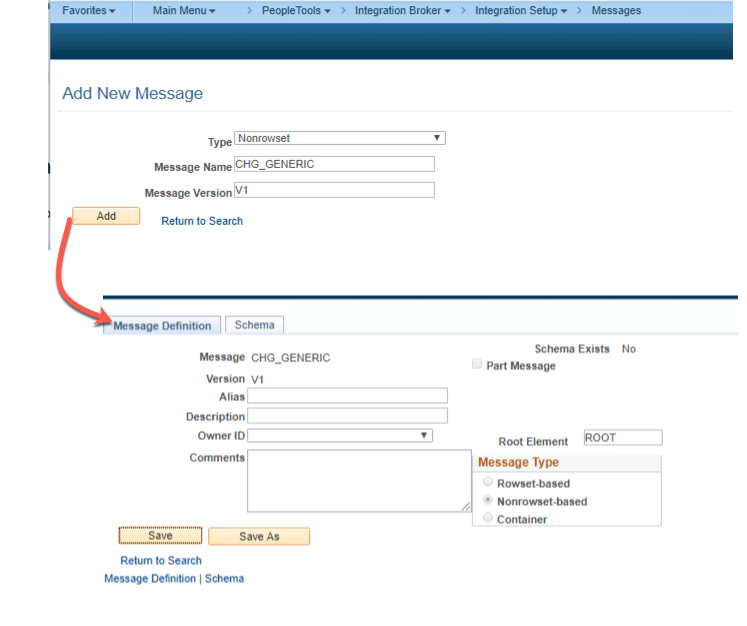
Create a New PeopleSoft Message Object

Now we need a PeopleSoft message object that will represent the XML that the client program will post.

Message AttributeValue
NameCHG_GENERIC
VersionV1
TypeNonrowset-based

Messages

Create a new Service

In this example, we create a new service.

Service AttributeValue
NameCHG_TEST

Create the Handler PeopleCode

Now we need to create some PeopleCode that will run when a new message is posted to the integration broker for this Service Operation.

  • Create an Application Package and Class with the following : CHG_ASYNC_TEST:asyncTest
  • Paste in the following code into the Class:
import PS_PT:Integration:INotificationHandler;


class asyncTest implements PS_PT:Integration:INotificationHandler
   method OnNotify(&_MSG As Message);
end-class;

method OnNotify
   /+ &_MSG as Message +/
   /+ Extends/implements PS_PT:Integration:INotificationHandler.OnNotify +/
   /* Variable Declaration */
   
   
   Local XmlDoc &doc;
   &doc = &_MSG.GetXmlDoc();
   
   Local XmlNode &xrootNode;;
   
   &xrootNode = &doc.DocumentElement;
   
   Local integer &ucount;
   SQLExec("SELECT COUNT(*) FROM PSOPRDEFN WHERE ACCTLOCK = 0 ", &ucount);
   

end-method;

This is a really dumb example that does nothing useful. However, what we can see is we can:

  • Get access to the XML submitted by the client using the &_MSG.GetXmlDoc(); method.
  • Run arbitrary PeopleCode like SQLExecs or whatever.
  • Notice that the OnNotify does NOT return anything.

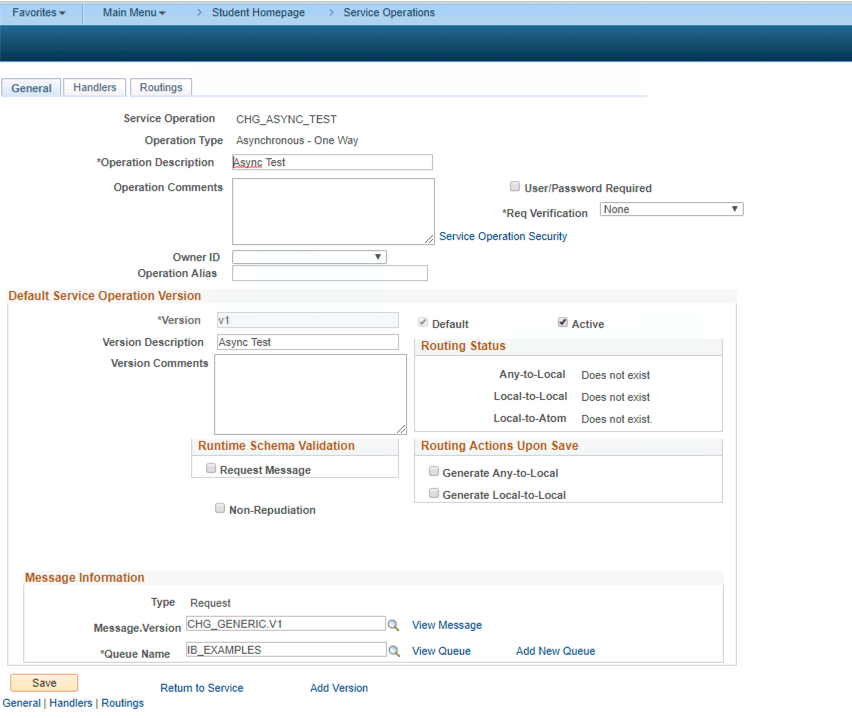
Setup new Service Operation

Now we need to setup the actual Service Operation. There are several steps here.

Service Operation AttributeValue
NameCHG_ASYNC_TEST
TypeAsynchronous - One Way
VersionV1
ActiveChecked
Message VersionCHG_GENERIC.V1
Queue NameIB_EXAMPLES (or create a new queue )
  • Click on the “Service Operation Security” link and add the permission we created in the pre-req section.

Service Operation Defn.

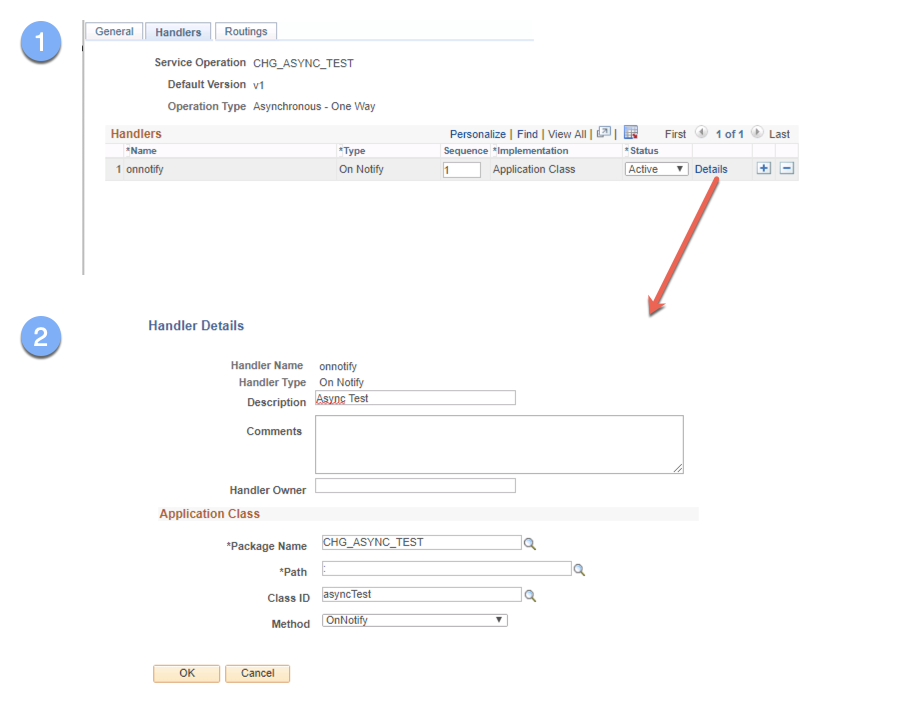
Now we need to hook in the CHG_ASYNC_TEST:asyncTest application class to execute when a service operation is posted. We do this on the Handler tab of the Service Operation.

Service Operation Handler AttributeValue
Handler NameTest
Handler TypeOn Notify
ImplementationApplication Class
DescriptionTester
Package NameCHG_ASYNC_TEST
Path:
Class IDasyncTest
MethodOnNotify

SO Handler

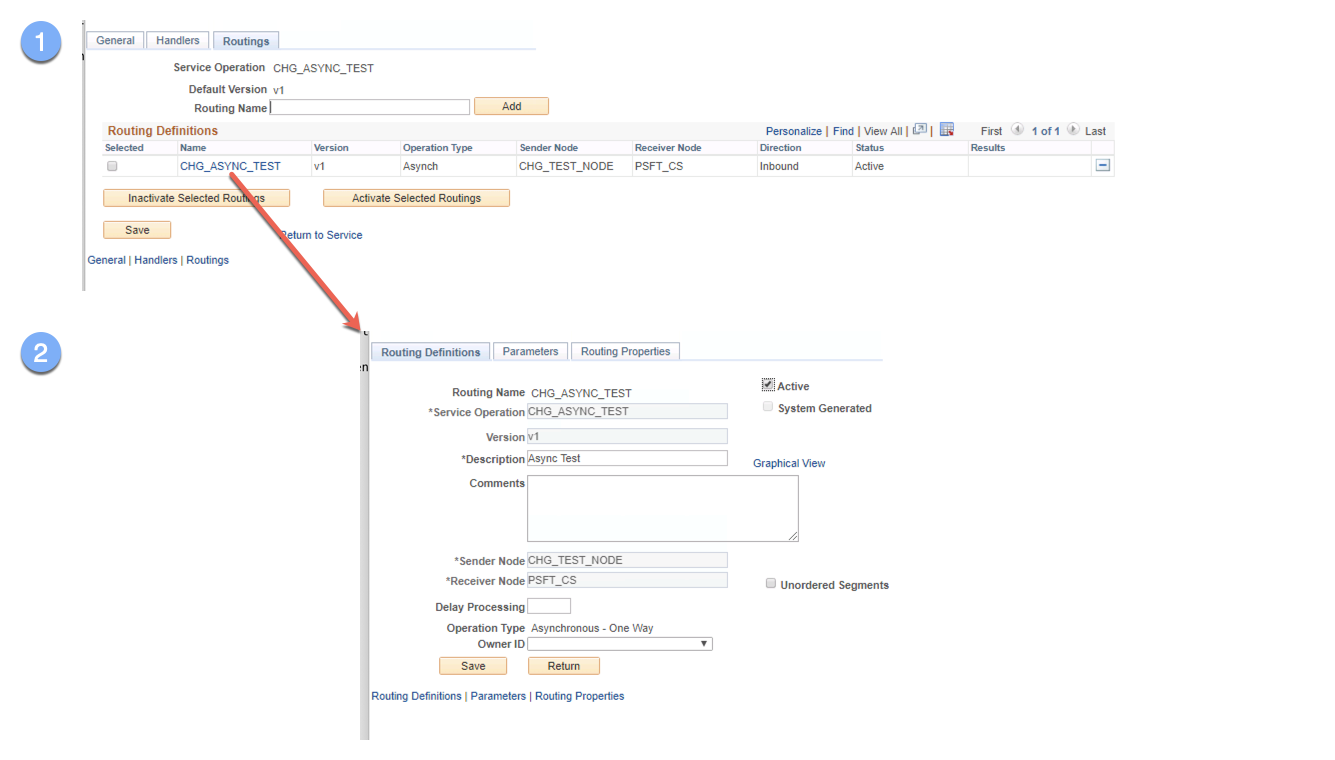
Now we need to setup the routing to make this node able to send Service Operations.

Service Operation Routing AttributeValue
routing nameCHG_ASYNC_TEST
sender nodeCHG_TEST_NODE
Receiver NodePSFT_CS (whatever your default local node is )
External AliasCHG_ASYNC_TEST.V1
ActiveChecked

SO Handler

Now our PeopleTools system should be ready to receive messages from some HTTP client.

Submitting data

Now we can use an HTTP Client to invoke the Service operation. Remember that this is an asynchronous service. This means that the actualy onNotify handler is actually handled at some point in the future. What we get back is a TransactionID in both the response payload and an response HTTP header. This is the ID that can be used to lookup the message determine what the handler did and if it ran.

Excel to Component Interface Utility

  To use the Excel to Component Interface utility, you must grant access to the iScript WEBLIB_SOAPTOCI in the permission list of the user w...