
Multicloud PeopleSoft deployment
Oracle Database Service for Microsoft Azure is an Oracle Cloud Infrastructure (OCI) service that delivers Oracle cloud databases directly to Microsoft Azure customers through the Oracle Interconnect for Azure (this capability is available between the two cloud environments in 11 regions around the world). Oracle Database Service for Microsoft Azure enables Azure administrators and developers to seamlessly connect their Azure applications to multiple OCI database services. You can build new applications that combine the full Azure catalog of AI, analytics, and Windows compute services with Oracle Database Services. This access is made possible through a guided process that securely connects Microsoft Azure and OCI accounts and a user interface for Azure professionals to deploy and manage OCI Database services.
Architecture
This architecture shows how to securely connect Microsoft Azure and Oracle Cloud Infrastructure (OCI) accounts. A user interface for Azure professionals enables you to deploy and manage OCI database services.
Oracle Database Service for Microsoft Azure supports the following Oracle Cloud database service offerings:
- Oracle Autonomous Database Shared
- Oracle Exadata Database Service
- Oracle Base Database
The following diagram illustrates this reference architecture implementation of PeopleSoft with Oracle Database Service for Microsoft Azure and Microsoft Azure compute. In this architecture Oracle Database Service for Microsoft Azure wires together components in Microsoft Azure and OCI tenants.
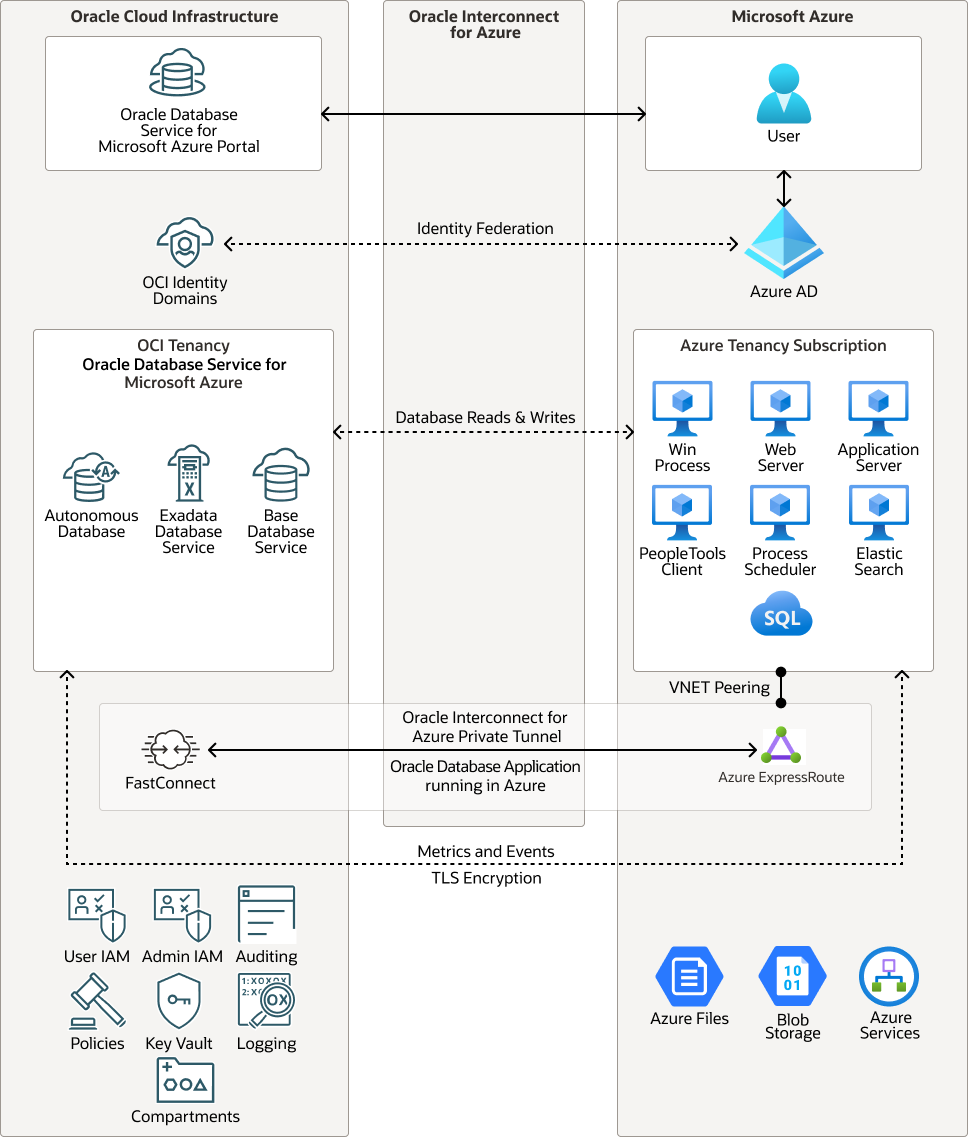
Description of the illustration peoplesoft-multicloud-deployment.png
- Account linking
Creates the configuration that connects an Azure tenancy to an OCI tenancy; this is a required step and must be completed before an authorized user can access the Oracle Database Service for Microsoft Azure Portal.
- Subscription linking
Links one or more Azure subscriptions to Oracle Database Service for Microsoft Azure to manage the billing.
- Identity federation (optional)
Enables Azure users to log into Oracle Database Service for Microsoft Azure using their Azure credentials. With identity federation, Oracle Database Service for Microsoft Azure streams much of the day-to-day operational data from Oracle Database Service for Microsoft Azure managed Oracle databases to Azure Application Insights and Azure Log Analytics.
For each database service, Oracle Database Service for Microsoft Azure supports the common administration and application access capabilities:
- Create, read, update, delete, list (CRUDL)
- Clone database
- Database backup (automatic and manual)
- Database restore (restore to existing database for now)
- Generate Azure connection string
- Display database metrics
The architecture has the following components:
- Tenancy
A tenancy is a secure and isolated partition that Oracle sets up within Oracle Cloud when you sign up for Oracle Cloud Infrastructure. You can create, organize, and administer your resources in Oracle Cloud within your tenancy. A tenancy is synonymous with a company or organization. Usually, a company will have a single tenancy and reflect its organizational structure within that tenancy. A single tenancy is usually associated with a single subscription, and a single subscription usually only has one tenancy.
- Compartment
Compartments are cross-region logical partitions within an Oracle Cloud Infrastructure tenancy. Use compartments to organize your resources in Oracle Cloud, control access to the resources, and set usage quotas. To control access to the resources in a given compartment, you define policies that specify who can access the resources and what actions they can perform.
- FastConnect
Oracle Cloud Infrastructure FastConnect provides an easy way to create a dedicated, private connection between your data center and Oracle Cloud Infrastructure. FastConnect provides higher-bandwidth options and a more reliable networking experience when compared with internet-based connections.
Oracle Base Database Service
Oracle Base Database Service is a fully managed database service that lets developers quickly develop and deploy secure, cloud native applications. Oracle automates all tasks, such as backup and recovery, database and operating system patching, updates, and data encryption.
- Autonomous Database
Oracle Cloud Infrastructure Autonomous Database is a fully managed, preconfigured database environments that you can use for transaction processing and data warehousing workloads. You do not need to configure or manage any hardware, or install any software. Oracle Cloud Infrastructure handles creating the database, as well as backing up, patching, upgrading, and tuning the database.
- Autonomous Data Warehouse
Oracle Autonomous Data Warehouse is a self-driving, self-securing, self-repairing database service that is optimized for data warehousing workloads. You do not need to configure or manage any hardware, or install any software. Oracle Cloud Infrastructure handles creating the database, as well as backing up, patching, upgrading, and tuning the database.
- Autonomous Transaction Processing
Oracle Autonomous Transaction Processing is a self-driving, self-securing, self-repairing database service that is optimized for transaction processing workloads. You do not need to configure or manage any hardware, or install any software. Oracle Cloud Infrastructure handles creating the database, as well as backing up, patching, upgrading, and tuning the database.
- Exadata Database Service
Oracle Exadata Database Service enables you to leverage the power of Exadata in the cloud. You can provision flexible X8M systems that allow you to add database compute servers and storage servers to your system as your needs grow. X8M systems offer RoCE (RDMA over Converged Ethernet) networking for high bandwidth and low latency, persistent memory (PMEM) modules, and intelligent Exadata software. You can provision X8M systems by using a shape that's equivalent to a quarter-rack X8 system, and then add database and storage servers at any time after provisioning.
- Oracle Interconnect for Azure
Oracle Interconnect for Azure is Oracle’s first multicloud offering. It delivers a direct network connection between specific Azure and Oracle Cloud Infrastructure (OCI) data centers around the world. It enables Azure administrators and developers to connect their applications to applications and services running in OCI without creating dedicated links or sending their application traffic across the public internet.
Considerations
Consider the following points when deploying this reference architecture.
- Identity Federation
Microsoft Azure users log into Oracle Database Service for Microsoft Azure using their Azure credentials. An Azure user must have Oracle Cloud Infrastructure (OCI) credentials to work in the OCI Console. For example, users must use the OCI Console to perform tasks not currently enabled through Oracle Database Service for Microsoft Azure. Oracle recommends that organizations federate their Azure user identities to OCI. With this in place, authorized users log in to Azure, Oracle Database Service for Microsoft Azure, and OCI using a single set of credentials – their existing Azure credentials.
- Support
Oracle Database Service for Microsoft Azure is jointly supported by Oracle and Microsoft through our existing partnership and Microsoft and Oracle Interconnect for Azure. Customers encountering an issue in Oracle Database Service for Microsoft Azure create an OCI Service Request directly from within the Oracle Database Service for Microsoft Azure Portal. OCI Support engineers work the issue and, when necessary, engage Microsoft Azure support to resolve the issue.
- Billing
OCI bills customers directly for Oracle Database Service for Microsoft Azure-provisioned resources. From the Oracle Database Service for Microsoft Azure Portal, authorized users can link directly to the OCI billing page to view details about their service use.
REST / HTTP methods: POST vs. PUT vs. PATCH
Each HTTP request consists of a method (sometimes called verb) that indicates the action to be performed on the identified resource.
When building RESTful Web-Services the HTTP method POST is typically used for resource creation while PUT is used for resource updates. While this is fine in most cases it can be also viable to use PUT for resource creation. PATCH is an alternative for resource updates as it allows partial updates.
In general we can say:
- POST requests create child resources at a server defined URI. POST is also used as general processing operation
- PUT requests create or replace the resource at the client defined URI
- PATCH requests update parts of the resource at the client defined URI
But let's look a bit more into details and see how these verbs are defined in the HTTP specification. The relevant part here is section 9 of the HTTP RFC (2616).
POST - "Create new"
The RFC describes the function of POST as:
The POST method is used to request that the origin server accept the entity enclosed in the request as a new subordinate of the resource identified by the Request-URI in the Request-Line.
This allows the client to create resources without knowing the URI for the new resource. For example, we can send a POST request to /projects to create a new project. The server can now create the project as a new subordinate of /project, for example: /projects/123. So when using POST for resource creation the server can decide the URI (and typically the ID) of the newly created resources.
When the server created a resource, it should respond with the 201 (Created) status code and a Location header that points to the newly created resource.
For example:
Request:
POST /projects HTTP/1.1
Content-Type: application/json

{
    "name": "my cool project",
    ...
}
Response:
HTTP/1.1 201 Created
Location: https://cool.api.com/projects/123
POST is not idempotent. So sending the same POST requests multiple times can result in the creation of multiple resources. Depending on your needs this might be a useful feature. If not, you should have some validation in place and make sure a resource is only created once based on some custom criteria (e.g. the project name has to be unique).
The RFC also tells us:
The action performed by the POST method might not result in a resource that can be identified by a URI. In this case, either 200 (OK) or 204 (No Content) is the appropriate response status, depending on whether or not the response includes an entity that describes the result.
This means that POST does not necessarily need to create resources. It can also be used to perform a generic action (e.g. starting a batch job, importing data or process something).
PUT - "Update existing if exists"
The main difference between POST and PUT is a different meaning of the request URI. The HTTP RFC says:
The URI in a POST request identifies the resource that will handle the enclosed entity. [..] In contrast, the URI in a PUT request identifies the entity enclosed with the request [..] and the server MUST NOT attempt to apply the request to some other resource.
For PUT requests the client needs to know the exact URI of the resource. We cannot send a PUT request to /projects and expect a new resource to be created at /projects/123. Instead, we have to send the PUT request directly to /projects/123. So if we want to create resources with PUT, the client needs to know (how to generate) the URI / ID of the new resource.
In situations where the client is able to generate the resource URI / ID for new resources, PUT should actually be preferred over POST. In these cases the resource creation is typically idempotent, which is a clear hint towards PUT.
It is fine to use PUT for creation and updating resources. So sending a PUT request to /projects/123 might create the project if it does not exist or replace the existing project. HTTP status codes should be used to inform the client if the resource has been created or updated.
The HTTP RFC tells us:
If a new resource is created, the origin server MUST inform the user agent via the 201 (Created) response. If an existing resource is modified, either the 200 (OK) or 204 (No Content) response codes SHOULD be sent to indicate successful completion of the request.
Generally speaking, if the exact resource URI is known and the operation is idemponent, PUT is typically a better choice than POST. In most situations this makes PUT a good choice for update requests.
However, there is one quirk that should be remembered for resource updates. According to the RFC, PUT should replace the existing resource with the new one. This means we cannot do partial updates. So, if we want to update a single field of the resource, we have to send a PUT request containing the complete resource.
PATCH - "Partial updates"
The HTTP PATCH method is defined in RFC 5789 as an extension to the earlier mentioned HTTP RFC. While PUT is used to replace an existing resource, PATCH is used to apply partial modifications to a resource.
Quoting the RFC:
With PATCH, [..], the enclosed entity contains a set of instructions describing how a resource currently residing on the origin server should be modified to produce a new version. The PATCH method affects the resource identified by the Request-URI, and it also MAY have side effects on other resources;
So PATCH, similar to POST, might also affect resources other than the one identified by the Request URI.
Often PATCH requests use the same format as the resource that should be updated and just omit the fields that should not change. However, it does not have to be this way. It is also fine to use a separate patch format, which describes how the resource should be modified.
PATCH is neither safe nor idempotent.
Maybe you are wondering in which situations a partial resource update is not idempotent. A simple example here is the addition of an item to an existing list resource, like adding a product to a shopping cart. Multiple (partial) update requests might add the product multiple times to the shopping cart.
More detailed information about the usage of PATCH can be found in my post about partial updates with PATCH.
SOAP vs. REST: The Differences and Benefits
Defining SOAP and REST
SOAP (Simple Object Access Protocol) and REST (Representational State Transfer) are both web service communication protocols. SOAP was long the standard approach to web service interfaces, although it’s been dominated by REST in recent years, with REST now representing more than 70% of public APIs. Understand the primary differences between SOAP vs. REST and how each can benefit your organization’s goals.
SOAP vs REST: Primary Differences
REST operates through a solitary, consistent interface to access named resources. It’s most commonly used when you’re exposing a public API over the Internet. SOAP, on the other hand, exposes components of application logic as services rather than data. Additionally, it operates through different interfaces. To put it simply, REST accesses data while SOAP performs operations through a more standardized set of messaging patterns. Still, in most cases, either REST or SOAP could be used to achieve the same outcome (and both are infinitely scalable), with some differences in how you’d configure it.
SOAP was originally created by Microsoft, and it’s been around a lot longer than REST. This gives it the advantage of being an established, legacy protocol. But REST has been around for a good time now as well. Plus, it entered the scene as a way to access web services in a much simpler way than possible with SOAP by using HTTP.
Benefits of REST Over SOAP
In addition to using HTTP for simplicity, REST offers a number of other benefits over SOAP:
- REST allows a greater variety of data formats, whereas SOAP only allows XML.
- Coupled with JSON (which typically works better with data and offers faster parsing), REST is generally considered easier to work with.
- Thanks to JSON, REST offers better support for browser clients.
- REST provides superior performance, particularly through caching for information that’s not altered and not dynamic.
- It is the protocol used most often for major services such as Yahoo, Ebay, Amazon, and even Google.
- REST is generally faster and uses less bandwidth. It’s also easier to integrate with existing websites with no need to refactor site infrastructure. This enables developers to work faster rather than spend time rewriting a site from scratch. Instead, they can simply add additional functionality.
Still, SOAP remains the preferred protocol for certain use cases. The general consensus among experts these days is that REST is the typically preferred protocol unless there’s a compelling reason to use SOAP (and there are some cases in which SOAP is preferred).
Benefits of SOAP Over REST
Because you can achieve most outcomes using either protocol, it’s sometimes a matter of personal preference. However, there are some use cases that SOAP tends to be better-suited for. For instance, if you need more robust security, SOAP’s support for WS-Security can come in handy. It offers some additional assurances for data privacy and integrity. It also provides support for identity verification through intermediaries rather than just point-to-point, as provided by SSL (which is supported by both SOAP and REST).
Another advantage of SOAP is that it offers built-in retry logic to compensate for failed communications. REST, on the other hand, doesn’t have a built-in messaging system. If a communication fails, the client has to deal with it by retrying. There’s also no standard set of rules for REST. This means that both parties (the service and the consumer) need to understand both content and context.
Other benefits of SOAP include:
- SOAP’s standard HTTP protocol makes it easier for it to operate across firewalls and proxies without modifications to the SOAP protocol itself. But, because it uses the complex XML format, it tends to be slower compared to middleware such as ICE and COBRA.
- Additionally, while it’s rarely needed, some use cases require greater transactional reliability than what can be achieved with HTTP (which limits REST in this capacity). If you need ACID-compliant transactions, SOAP is the way to go.
- In some cases, designing SOAP services can actually be less complex compared to REST. For web services that support complex operations, requiring content and context to be maintained, designing a SOAP service requires less coding in the application layer for transactions, security, trust, and other elements.
- SOAP is highly extensible through other protocols and technologies. In addition to WS-Security, SOAP supports WS-Addressing, WS-Coordination, WS-ReliableMessaging, and a host of other web services standards, a full list of which you can find on W3C.
At the end of the day, the best protocol is the one that makes the most sense for the organization, the types of clients that you need to support, and what you need in terms of flexibility. Most new APIs are built using REST and JSON, simply because it typically consumes less bandwidth and is easier to understand both for developers implementing initial APIs as well as other developers who may write other services against it. Because it’s more easily consumed by most of today’s web browsers, REST+JSON has become the defacto technology for the majority of public APIs. However, SOAP remains a valuable protocol in some circumstances. Plus, you don’t have to look far to find die-hard fans advocating for SOAP for certain use cases.
JSON Decoding Examples - IB REST Services
First we will look at a simple REST JSON Post. The screenshot below has the service operation setup. This is the most simple web service. You will notice that:
- There is no
Templateother than/ - There is no
Document Templatebecause we are not passing any parameters - The Request and Response Message objects are both
CHG_GENERIC.V1which is a “Nonrowset-based” based messages. This is is not shown.
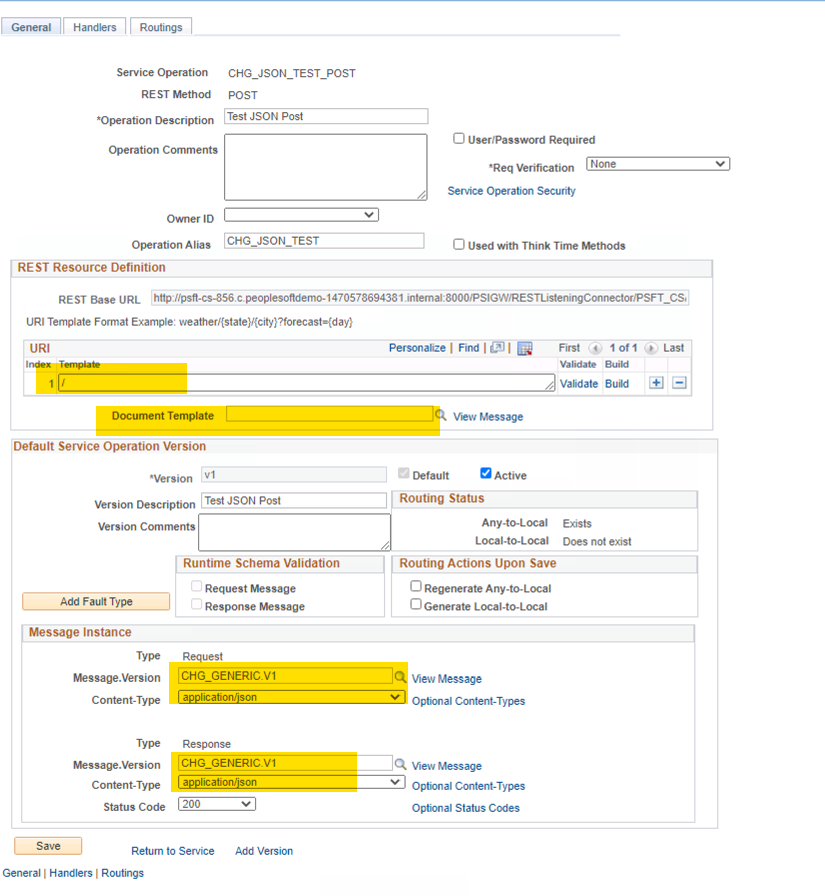
We plan on posting some simple JSON to this. The HTTP Signature will look like this:
POST http://localhost:8000/PSIGW/RESTListeningConnector/PSFT_CS/CHG_JSON_TEST.v1/
Authorization: Basic UFM6dHJ5aW5nLXNlZS1pZi1JLXBvc3RlZC1teS1wYXNzd29yZC1JLXNlZQ==
Content-Type: application/json

{
   "firstName": "Chris",
   "lastName": "Malek",
   "Region": "Southern California",
   "FavoriteDesert": "Pie, any kind"
}
The response that comes out of this web services the following.
HTTP/1.1 200 OK
Connection: close
Date: Wed, 02 Dec 2020 04:33:21 GMT
Content-Length: 234
Content-Type: application/json; encoding="UTF-8"
Content-Encoding: gzip
Set-Cookie: JSESSIONID=6zshuetDLvmVT5G55VCUt0su3nVWAn469hsagTQOqg0zHVExziNa!-1985259815; path=/; HttpOnly,psmap=; domain=.c.peoplesoftdemo-1470578694381.internal; path=/

{

  "firstName": "Chris",
  "lastName": "Malek",
  "Region": "Southern California",
  "FavoriteDesert": "Pie, any kind",
  "META": {

    "OPRID": "PS",
    "CURRENT_TIME": "2020-12-02 04:33:21.000000",
    "TRANSACTION_ID": "81fa5f4b-3457-11eb-9b6b-e783fa52141b",
    "DBNAME": "CS92U009"
  }
}
The handler parses the inbound root JSON object strings and echos any value back out. We also add a “META” object with some information about the run-time environment.
The entire PeopleCode handler for this web service is:
| |
With this simple example you can see:
- How to get the raw unparsed JSON string from the request message
- Parse a simple JSON object
- Return back JSON data
This web service has no:
- Error Handling
- JSON detection of different data types
- Any real practical use
Excel to Component Interface Utility
To use the Excel to Component Interface utility, you must grant access to the iScript WEBLIB_SOAPTOCI in the permission list of the user w...

-
REST Web Services in PeopleSoft 1. Service Configuration Navigation: PeopleTools > Integration Broker > Configuration > Service Co...
-
SQL Query to Retrieve all Records associated with a PeopleSoft Component SELECT R . RECNAME AS RECORD_NAME , ( CASE ...
-
1) Explain what is PeopleSoft? PeopleSoft is an organization that provides e-business application software over the internet. It provid...
