Pagelets in PeopleSoft

 Pagelets is a powerfull feature introduced in later releases of People Tools. Pagelets can be considered as the widgets or apps which are familiar to us in the internet websites. Pagelets brings in information from the transaction tables in a very presentable format or widget style. These pagelets will be smaller in size and can be added to HomePages, WorkCenters and Dashboards. There are three sizes for pagelets narrow, wide and banner sizes. The page/space where we host the pagelet can hold multiple pagelets at the same time.


It can be used to display simple yet compelling information like notice; high priority items awaiting your approval, frequently used metrics etc. On pagelets users can further filter down the data to get the more relevant data. These filters can be saved and are called as Personalization. Like the usual widgets you see around in the normal life, PeopleSoft pagelets also has the option to refresh the particular piece of information without disturbing the actual page where this pagelet is hosted. Thus the specific information can be updated without navigating away or reloading the entire page. We also have an option to auto refresh the pagelet every n seconds we specify. It will be particularly helpful in displaying time sensitive information.

Peoplesoft pagelets can be created by using different technologies which includes PeopleSoft Component, PeopleSoft iScript and javascript. The easiest one will be the PeopleSoft Component based pagelets. I will explain how to create PeopleSoft Component based pagelets in the rest of the content.

While creating pagelet, you should be extremely concerned about the performance of the system. Because the pagelet will be hosted in some other space where there can be multiple pagelets. So if one pagelet hangs due to bad design, then user won’t be able to work on any other pagelets hosted on the page. So you should design your pagelet in such a manner that, the data and the page will be loaded very fast.

Below are the steps to create Pagelet in PeopleSoft.

Step 1: Create a normal Page, design it the way you want to be displayed in the pagelet.

Step 2: Create another page which you want to use as a personalization option for the pagelet. In this page you will put fields which will act as input values/filters for the data that is displayed in the pagelet.

Step 3: Add the pages to corresponding components.

Step 4: Write any business logic, such as filtering the data in the first page based on the data from the personalization page and other business logic you want to implement.

Step 5: Add your component to a menu.

Till now you have been doing the regular steps in creating PeopleSoft components. Now you need to register this as a pagelet.

Step 6:  Go to Structure and content: People Tools > Portal > Structure and Content

Step 7: Navigate to: Root > Portal Objects > Pagelets > [Folder where you want to register]

Step 8:  Click on Add Content Reference

Step 9: Provide the content name, label, description etc. Give the usage type as Pagelet.


Step 10: In the URL information group box, provide the node, menu, market and component of the pagelet page (page created in step 1). Select the URL Type as PeopleSoft Component.


Step 11:  [Optional: required only if personalization is needed] On the pagelet Attributes group box, provide the menu, component and market for the personalization page (Page created in step 2). Select the URL Type as PeopleSoft Component. Populate the Refresh Time (sec) field with a value in seconds if you want your pagelet to be refreshed automatically every nth second.


Step 12: Save the Content reference.

Step 13: Go to: People Tools > Security > Permissions & Roles > Permission Lists and open the permission list which is supposed for the pagelet users and provide required access to the new components. Save the Permission List.

With the above simple steps you have successfully created a pagelet. Now in order to use the pagelet, select the pagelet from the corresponding pages personalization option and save it. For example, to add the new pagelet to the homepage, click on Home and on the home page select Personalization hyperlink. From the list of pagelets displayed, select your pagelet and click on save. When you go back to the homepage, you can see your pagelet in the homepage. Now you can drag to arrange the pagelet in the required order among the other pagelets.

PeopleCode OriginalValue and PriorValue

 OriginalValue


This a useful property of a field class if you want to revert the changes or compare with the previous value of the field.

&Value = RECORD.FIELD.OriginalValue;

This statement always returns the value of the field in the database at that particular point of time. For the same reason, this property will not work for derived records.
Say my field has value “FIRST” in the database and I change it to “SECOND” and save it. Let us analyze the return value at various point of time.

n  Component Loaded & value not yet changed.
&Value = RECORD.FIELD.OriginalValue; /* Returns FIRST */
&Value = RECORD.FIELD.Value;/* Returns FIRST */

n  After  changing the value to SECOND & before saving
&Value = RECORD.FIELD.OriginalValue; /* Returns FIRST */
&Value = RECORD.FIELD.Value;/* Returns SECOND */

n  After saving the changes
&Value = RECORD.FIELD.OriginalValue; /* Returns SECOND */
&Value = RECORD.FIELD.Value;/* Returns SECOND */


This function can be used to compare the value with previous value and do some complex functionality. It is, if the change in amount field is more than 10%, then trigger the workflow.
Another use case will be to revert the changes back if some criteria is not met.

Well this is quite useful, but if the field is a derived work record field, this property will not work at all. PriorValue() is a lifesaver here.

PriorValue


Although it is similar to OriginalValue, there is a notable difference. This always returns the value in the buffer just before the change.


Let me explain it. Suppose the value in data base is FIRST and after that I changes the value in the below pattern.

FIRST -> SECOND -> THIRD -> FOURTH


Now if I execute Original value, it will return FIRST where as PriorValue will return THIRD (the value just before the last change)

&Value = RECORD.FIELD.OriginalValue; /* Returns FIRST */
&Value = RECORD.FIELD.Value;/* Returns FOURTH*/ 
&Value = PriorValue(RECORD.FIELD); /* Returns THIRD */


The advantage is that you can use this function for a derived record also as the value is fetched from buffer and not from database.

Note:- There are two restrictions for usage of PriorValue to work correctly.

1.       It should be placed in FieldChange or FieldEdit events
2.       It  should be placed in the same record field event. For example if the record field is JOURNAL.JOURNAL_ID.  Then the code should be placed in either JOURNAL.JOURNAL_ID.FieldEdit or JOURNAL.JOURNAL_ID.FieldChange.

In all other cases PriorValue() will return the current value of field instead of prior value.

A Complete PeopleSoft REST POST Web Service Example

In the example we will create a simple REST POST service that accepts data and inserts into a staging table for later processing. Here we will explore sending data to PeopleSoft.

Staging Data

First we need to create a table that we will store data in. This simple web service example will take the raw data from the HTTP POST and perform a SQL Insert into a staging table.

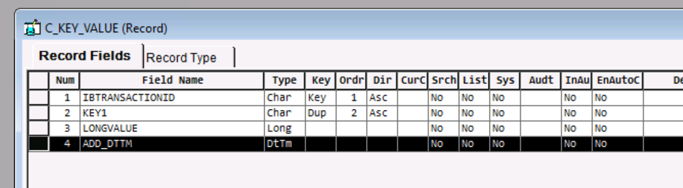
We are going to create a simple table that accepts key/value pairs.

  • Record Name: C_KEY_VALUE
    • Field: IBTRANSACTIONID - Key value. The IB created a unique GUID of every transaction and we will use that in our table to create a unique value.
    • Field: KEY1 - This will be a “duplicate key” and is a string that the payload will pass in. We will allow the same key to be sent more than once.
    • Field: LONGVALUE - This is the “value” of the key and we accept a long value.
    • Field: ADD_DTTM - This will be the date time that the value was inserted.

Creating a Generic Message for Request Response

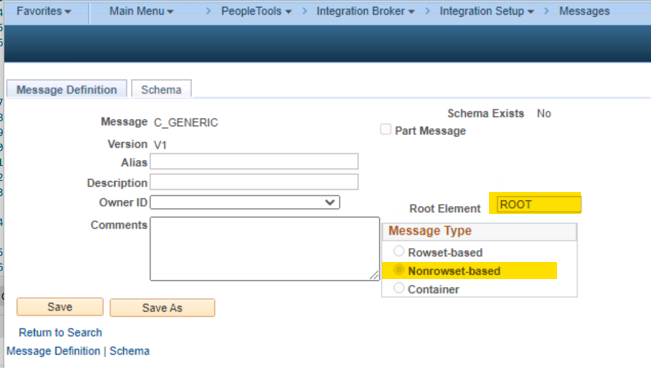
In order to have the most flexibility you need to use a NonRowset Message. This will allow us to accept any data encoding and return any data encoding. I generally have a generic message like this that is shared across many web services. In this case, the message is NOT going to provide any sort of functionality for us. We just need it as a required field in the Service Operation setup. We will handle all of the decoding and encoding of data in the PeopleCode handler below.

Creating The Service

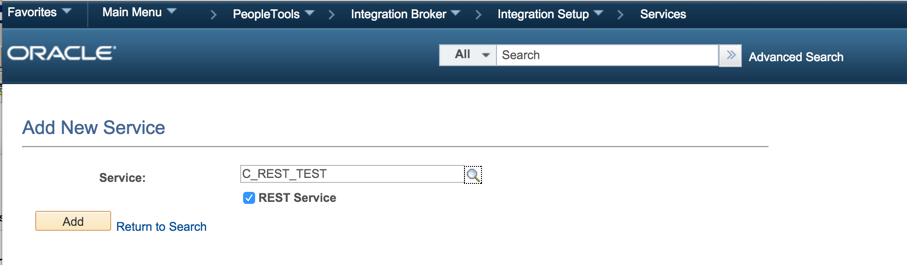
Now we need to create a REST Service which will “group” or “own” our service operation. It really does not provide any functionality other than organization in the IB setup and security.

Creating the POST Service Operation

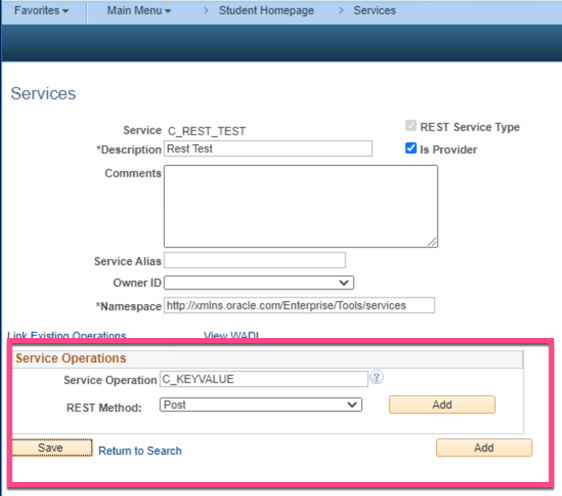
Now from the Service we created above, you can create the new POST Service Operation. You see here that we enter in C_KEYVALUE and then choose the “Rest Method” of “Post”. Choose your name wisely here as you will be stuck with this going forward and your clients will end up using this in the URLs for REST.

When you click the “Add” button, you will be transfered to the Service Operation Setup page.

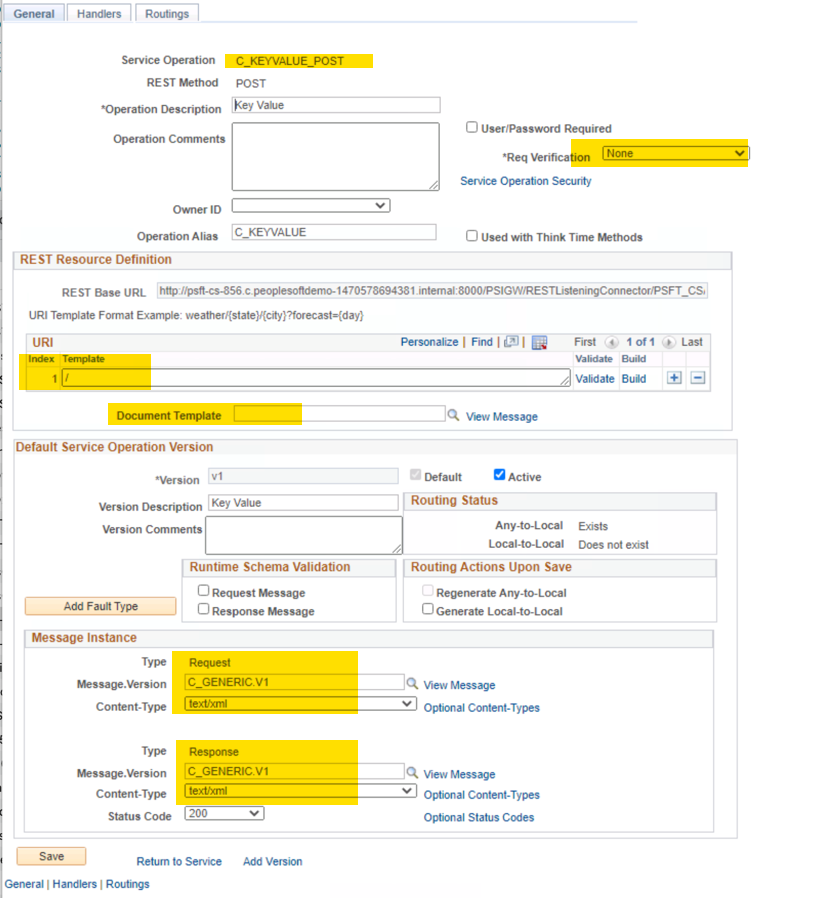
We need to highlight some key points here that often cause much confusing with developers.

  • Service Operation Name: You will see that the service operation name turned into N_KEYVALUE_POST. PeopleTools automatically added the “POST” to the end which ties to the HTTP method chosen. So if you plan on supporting GET, DELETE, and POST methods you will end up being 3 different service operations for those named N_KEYVALUE_GET, N_KEYVALUE_DELETE, N_KEYVALUE_POST respectively. We will just be created the POST in this example.
  • Req Verification: This looks like there is no security tied to this. Ignore this for now.
  • URI Template: We are only entering a “/” here because we are NOT asking for any query string parameters. The Service operation name will be enough in the URL.
  • Document Template: Note that this is blank! Since we are NOT planning on using any query string parameters in the POST then we do NOT need to have a document template. That is only required for parsing query string parameters.
  • Message Request and Response: We are using the C_GENERIC message here in the request and response.

This is enough information to save the service operation. Since all of the “magic” of this web service will be handled in the PeopleCode handler, the service operation definition is just a shell in order from the Integration Broker to bootstrap our PeopleCode handler when a request comes in.

Routings

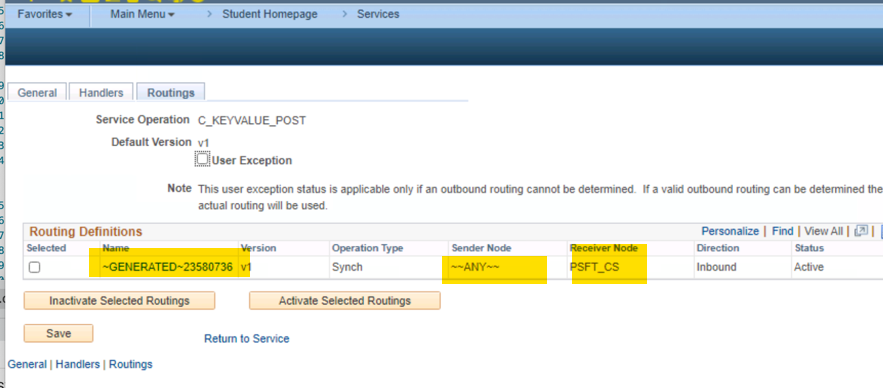
A Service Operation needs to have “routings” configured for it to be functional. This tells the IB engine what PeopleSoft nodes to send or accept messages from. In SOAP and HTTP based services, those are important and the Node Best Practices Section has some opinions documented.

In REST, PeopleSoft will handle all the Routing configurations for you and they are configured as “Any to default local node”. I have found that if you try to add routings manually it confuses the integration broker and the REST logic will NOT be triggered. This must be based on some internal PeopleTools logic. In our case, the routings look like this. There is no reason to add, remove or modify routings for REST based services. See REST Security for more information and best practices.

Right now we have a basic service operation without a handler configured and without any security applied. Let’s see what happens if we try to call this web service.

Here is the basic HTTP Request.

POST http://35.236.3.31:8000/PSIGW/RESTListeningConnector/PSFT_CS/C_KEYVALUE.v1/ HTTP/1.1

Here is the response sent back from the integration broker.

HTTP/1.1 200 OK
Connection: close
Date: Sun, 14 Mar 2021 18:23:56 GMT
Content-Length: 144
Content-Type: text/html; charset=UTF-8
Content-Encoding: gzip
Set-Cookie: JSESSIONID=onkx-wDsqoMNrCdQ2SuwK4RO4CsVprPqjSZR1J9WBvCAQTEyWoft!-1454137333; path=/; HttpOnly

<HTML><HEAD><TITLE>RESTListeningConnector</TITLE></HEAD><BODY>UserID NO_ACCESS not authorized for Service Operation C_KEYVALUE_POST</BODY></HTML>

You will see from the response that it never got past the security validation. We did not send any authentication information in the request and we have NOT add this service operations to any sort of permission lists. This is important to note because the service operation configuration shown above has a Req Verification flag unchecked. That could be falsely interpreted as “this is open to the world” but that is untrue. One funky think on the tools release I am testing on this returned a HTTP 200 OK status which is a bug.

Setting Up Service Operation Security

We need a valid PeopleSoft user to be able to invoke this service operation. We are going to add this service operation to a permission list and valid user. That is covered in both the REST Security and Simple REST GET Example sections and I will assume you have read those sections and I will not cover them here again.

Implementing the Handler

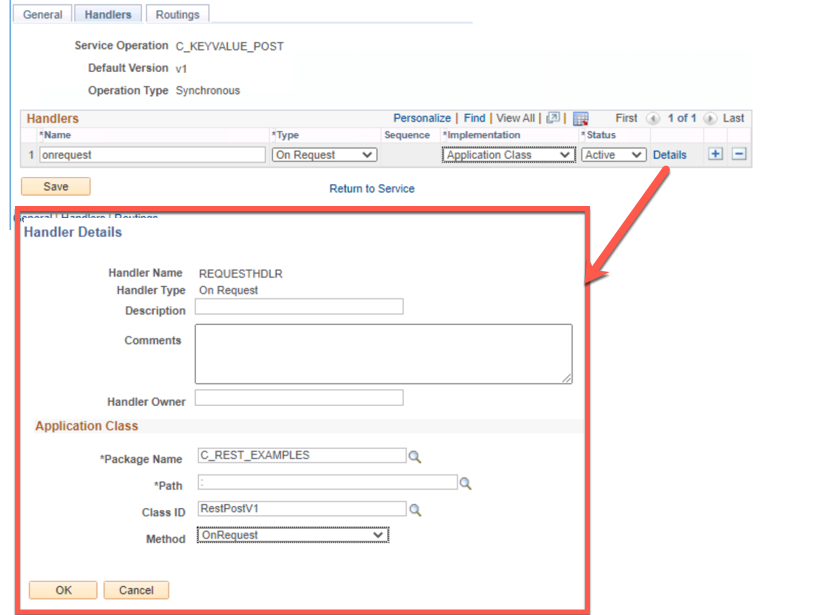
Up to this point we have not configured one of the most important pieces of the web service. That would be the handler which will be an Application Class that is implemented in a certain way. Let’s establish a base working handler that we will build upon as we work through this example.

The PeopleCode handler below:

  • Is not useful other than a basic starting point.
  • Responds back with a hard coded “hello world” xml document for now.
  • Does not process any input yet.
import PS_PT:Integration:IRequestHandler;

class RestPostV1 implements PS_PT:Integration:IRequestHandler
   method OnRequest(&msgRequest As Message) Returns Message;
   
end-class;

method OnRequest
   /+ &msgRequest as Message +/
   /+ Returns Message +/
   /+ Extends/implements PS_PT:Integration:IRequestHandler.OnRequest +/
   
   Local Message &response = CreateMessage(@("Operation." | &msgRequest.OperationName), %IntBroker_Response);
   
   Local XmlDoc &xmlout;
   Local XmlNode &childNode;
   
   &xmlout = CreateXmlDoc("<?xml version='1.0'?><response/>");
   
   &childNode = &xmlout.DocumentElement.AddElement("hello").AddText("world");
   
   &response.SetXmlDoc(&xmlout);
   
   Return &response;
end-method;

Now we need to configure the service operation to run this PeopleCode when a request is received. That is done on the “Handler” tab of the service operation.

Testing Round 1

Now we security setup (not shown) and a handler let’s call the web service over HTTP. We will send in a request body payload but the handler is not code to do anything with it and it will be ignored.

Here is the request:

POST http://35.236.3.31:8000/PSIGW/RESTListeningConnector/PSFT_CS/C_KEYVALUE.v1/ HTTP/1.1
Authorization: Basic UkVTVF9URVNUX1VTRVI6QmFkI1Bhc3N3b3JkIzEyMw==
Content-Type: text/xml; encoding="UTF-8"

<?xml version="1.0"?>
<request>
    <row>
        <key>EMPLID</key>
        <value>111111</value>
    </row>
    <row>
        <key>FAVORITE_FOOD</key>
        <value>Pizza</value>
    </row>
    <row>
        <key>FAVORITE_DRINK</key>
        <value>Lemo ade</value>
    </row>
</request>

Here is the response:

HTTP/1.1 200 OK
Connection: close
Date: Sun, 14 Mar 2021 18:41:47 GMT
Content-Length: 72
Content-Type: text/xml; encoding="UTF-8"
Content-Encoding: gzip
Set-Cookie: JSESSIONID=dWsyC1Y0wyok2-ErWgvfiDGN3C2IetXZ0AVI43z1FQjKvZcD5sDi!-1454137333; path=/; HttpOnly,psmap=; domain=.c.peoplesoftdemo-1470578694381.internal; path=/

<?xml version="1.0"?>
<response>
  <hello>world</hello>
</response>

What would happen if we tried to call this same service operation with a GET method? If you recall from above the “GET” method would actually be a separate service operation called C_KEYVALUE_GET but we did not create that. Let’s try to call it.

GET http://35.236.3.31:8000/PSIGW/RESTListeningConnector/PSFT_CS/C_KEYVALUE.v1/ HTTP/1.1
Authorization: Basic UkVTVF9URVNUX1VTRVI6QmFkI1Bhc3N3b3JkIzEyMw==

Here is the response, the HTTP Response code is 200 (Success) which is NOT the correct response code. This is an example of one of those rough edges.

HTTP/1.1 200 OK
Connection: close
Date: Sun, 14 Mar 2021 20:52:05 GMT
Content-Length: 140
Content-Type: text/html; charset=UTF-8
X-ORACLE-DMS-ECID: c8d9efad-cb10-4ec8-bc1c-a59fc852e83a-00000014
Content-Encoding: gzip
Set-Cookie: JSESSIONID=JFgygqLYRnO1h9hPakWpaFAXQ2ObIOdveA1RUkT3g1C5YrGLAuff!1814625920; path=/; HttpOnly
X-ORACLE-DMS-RID: 0

<HTML><HEAD><TITLE>RESTListeningConnector</TITLE></HEAD><BODY>Service Version Method  GET for Service C_KEYVALUE.v1 not found in DB.</BODY></HTML>

Expanding the Handler

Now let’s go deeper into the handler and parse the XML sent by the client and insert it into our table. Please be sure to read the Best Practices with PeopleSoft Table Updates and Inserts regarding updates.

We are going to expect XML that resembles this:

<?xml version="1.0"?>
<request>
    <row>
        <key>EMPLID</key>
        <value>111111</value>
    </row>
    <row>
        <key>FAVORITE_FOOD</key>
        <value>Pizza</value>
    </row>
    <row>
        <key>FAVORITE_DRINK</key>
        <value>Lemo ade</value>
    </row>
</request>
  • The client can pass in any number of rows.
  • For each row, we are expecting a key and value node which we will use to insert into out key value table C_KEY_VALUE.

Here is the completed handler that will:

  • Parse the XML
  • Insert into C_KEY_VALUE
  • Return some meta-data about the request.
 1
 2
 3
 4
 5
 6
 7
 8
 9
10
11
12
13
14
15
16
17
18
19
20
21
22
23
24
25
26
27
28
29
30
31
32
33
34
35
36
37
38
39
40
41
42
43
44
45
46
47
48
49
50
51
52
53
54
55
56
57
58
59
60
61
62
63
64
65
66
67
68
69
70
71
72
73
74
75
76
77
78
import PS_PT:Integration:IRequestHandler;


class RestPostV1 implements PS_PT:Integration:IRequestHandler
   method OnRequest(&msgRequest As Message) Returns Message;
   
end-class;


method OnRequest
   /+ &msgRequest as Message +/
   /+ Returns Message +/
   /+ Extends/implements PS_PT:Integration:IRequestHandler.OnRequest +/
   
   Local Message &response = CreateMessage(@("Operation." | &msgRequest.OperationName), %IntBroker_Response);
   
   /* Parse Input */
   
   Local XmlDoc &xmlDocRequest = &msgRequest.GetXmlDoc();
   Local XmlNode &requestRootNode = &xmlDocRequest.DocumentElement;
   Local string &key, &value;
   
   
   Local array of XmlNode &rowNodes;
   &rowNodes = &requestRootNode.GetElementsByTagName("row");
   
   Local integer &i, &j;
   
   /* loop over each "row" found */
   For &i = 1 To &rowNodes.Len
      
      Local Record &recKV;
      &recKV = CreateRecord(Record.C_KEY_VALUE);
      &recKV.IBTRANSACTIONID.Value = &msgRequest.TransactionId;
      &recKV.ADD_DTTM.Value = %Datetime;
      
      /* Loop over each XML child node pulling out only the key & value nodes */
      For &j = 1 To &rowNodes [&i].ChildNodeCount
         
         Local XmlNode &nodeInspect;
         &nodeInspect = &rowNodes [&i].GetChildNode(&j);
         
         Evaluate Lower(&nodeInspect.NodeName)
         When = "key"
            &recKV.KEY1.Value = &nodeInspect.NodeValue;
            Break;
         When = "value"
            &recKV.LONGVALUE.Value = &nodeInspect.NodeValue;
            Break;
         End-Evaluate;
         
      End-For;
      
      
      &recKV.Insert();
      
      
   End-For;
   
   
   /* Setup Output */
   
   Local XmlDoc &xmlDocResponse;
   Local XmlNode &childNode;
   
   &xmlDocResponse = CreateXmlDoc("<?xml version='1.0'?><RESPONSE/>");
   
   Local XmlNode &nxMetaNode, &xnTemp;
   &nxMetaNode = &xmlDocResponse.DocumentElement.AddElement("META");
   &xnTemp = &nxMetaNode.AddElement("OPRID").AddText(%OperatorId);
   &xnTemp = &nxMetaNode.AddElement("CURRENT_TIME").AddText(String(%Datetime));
   &xnTemp = &nxMetaNode.AddElement("TRANSACTION_ID").AddText(&msgRequest.TransactionId);
   &xnTemp = &nxMetaNode.AddElement("DBNAME").AddText(%DbName);
   &response.SetXmlDoc(&xmlDocResponse);
   
   Return &response;
   
end-method;

Testing Full Handler

Here is a full request.

POST http://35.236.3.31:8000/PSIGW/RESTListeningConnector/PSFT_CS/C_KEYVALUE.v1/ HTTP/1.1
Authorization: Basic UkVTVF9URVNUX1VTRVI6QmFkI1Bhc3N3b3JkIzEyMw==
Content-Type: text/xml; encoding="UTF-8"

<?xml version="1.0"?>
<request>
  <row>
    <key>EMPLID</key>
    <value>111111</value>
  </row>
  <row>
    <key>FAVORITE_FOOD</key>
    <value>Pizza</value>
  </row>
  <row>
    <key>FAVORITE_DRINK</key>
    <value>Lemonade</value>
  </row>
</request>

The response that came back from our handler is:

HTTP/1.1 200 OK
Connection: close
Date: Sun, 14 Mar 2021 21:24:15 GMT
Content-Length: 203
Content-Type: text/xml; encoding="UTF-8"
Content-Encoding: gzip
Set-Cookie: JSESSIONID=R8kyoBYAGiP-cljZYIDnd2gWkm3P56EG4x1mW8LCLHFiY_rzJP1R!1814625920; path=/; HttpOnly,psmap=; domain=.c.peoplesoftdemo-1470578694381.internal; path=/

<?xml version="1.0"?>
<response>
  <META isMETA="True">
    <OPRID>REST_TEST_USER</OPRID>
    <CURRENT_TIME>2021-03-14-21.24.15.000000</CURRENT_TIME>
    <TRANSACTION_ID>a0e158cd-850b-11eb-a700-cd5c40da7841</TRANSACTION_ID>
    <DBNAME>CS92U009</DBNAME>
  </META>
</response>

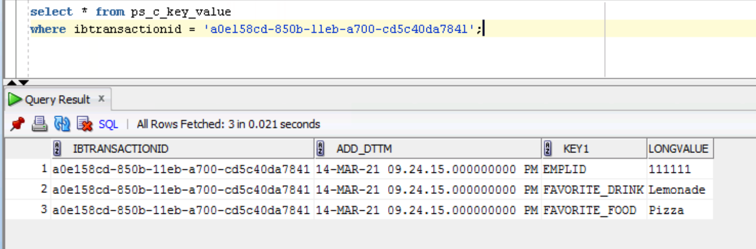
Here we can see the data was inserted into our table.

Excel to Component Interface Utility

  To use the Excel to Component Interface utility, you must grant access to the iScript WEBLIB_SOAPTOCI in the permission list of the user w...